Projector Glossary: 80+ common technical terms explained
Amber Stefanson | July 31, 2026
What's the difference between ANSI lumens and regular lumens? Is a 30,000:1 contrast ratio actually good? Projector marketing is full of numbers that sound impressive but don't always mean what you'd expect.
In this glossary, I'll walk you through the most common technical and marketing terms used for projectors. I'll keep my definitions short and simple, no engineering degree needed.
A
Airflow
Airflow refers to the flow of air through the projector vents. Cool air comes in and hot air goes out. This is what helps prevent overheating. To allow enough airflow, it’s good to keep at least 18 inches of space beside each projector vent.
Air Mouse
Air Mouse is a feature on Bluetooth remotes that enables you to control the projector by pointing the remote at the screen. When using Air Mouse, a cursor appears on screen, which you can use to hover over options and select them.
See also: Bluetooth Remote
ALPD
ALPD stands for “Advanced Laser Phosphor Display”. It’s the laser engine that powers high-end laser projectors. If you see "ALPD 4.0" or "ALPD 5.0", this denotes the generation. In general, the later the generation, the better the brightness and energy-efficiency.
See also: Laser
ALR
ALR stands for “Ambient Light-Rejecting”. It's a type of screen engineered to block ambient light from affecting a projected image. Using an ALR screen will significantly increase perceived contrast and brightness, especially during the day or with the lights on.
See also: CLR, Fresnel Screen
ANSI
ANSI stands for “American National Standards Institute”. They’re an organization that creates standards for measuring technology, including brightness (Lumens) and contrast. ANSI Lumens and Contrast are more trustworthy than generic measurements, since ANSI has strict requirements to prevent specs from being overinflated.
See also: ANSI Contrast, ANSI Lumens, ISO Lumens, FOFO Contrast, Lumens
ANSI Contrast
ANSI Contrast, or “Checkerboard Contrast”, is a standard measurement of the contrast on a projector or other display. ANSI Contrast is considered trustworthy because it measures the effect of light bleed from having dark and light values on screen at the same time. This is more representative of actual viewing conditions than FOFO Contrast, which measures the minimum and maximum brightness on their own.
See also: Contrast Ratio, FOFO Contrast
ANSI Lumens
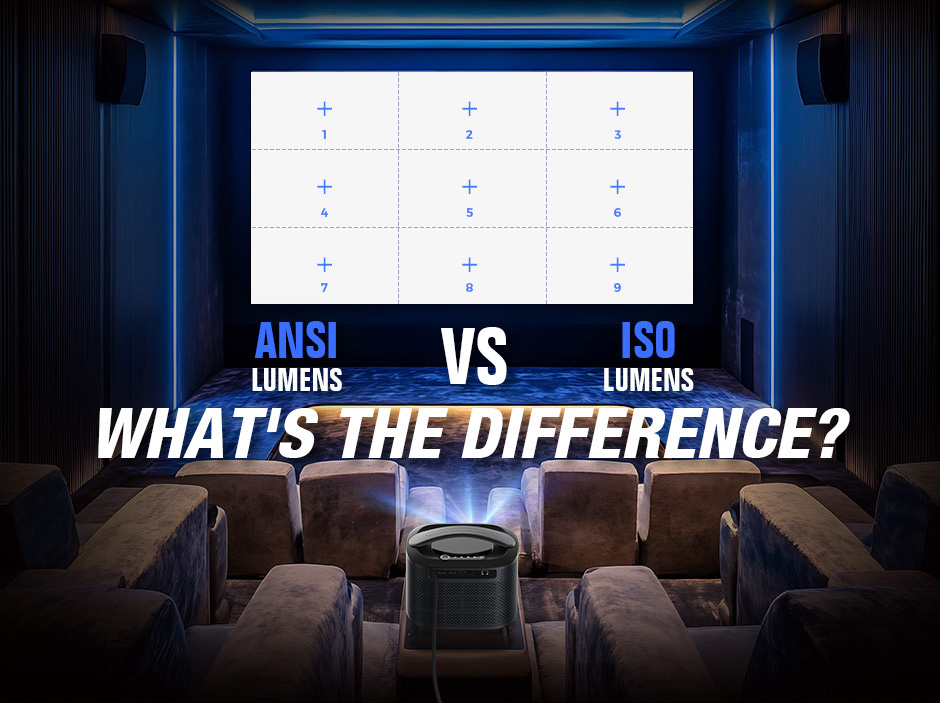
ANSI Lumens are a standard measurement of brightness on a projector or other display. Technicians measure ANSI Lumens by dividing the display into 9 sections, measuring the luminance of each corner and edge, as well as the center. ANSI Lumens are considered more trustworthy than generic lumens, which are unstandardized.
See also: ISO Lumens, Lumens
APK
APK stands for “Android Package Kit”. It’s a file type for downloading and installing apps onto devices that use Android operating systems. They can be used on Android-based projectors to sideload apps like Netflix and Amazon Prime without a dedicated app store.
ARC / eARC
ARC, or “audio return channel”, is a feature that enables an HDMI port to be used with an audio device (for individual speakers or soundbars) or an audio receiver (for surround sound setups).
When this feature is enabled, audio from all other HDMI devices will go directly through the ARC. This results in better overall audio, since audio flows directly to the speakers without being compressed or decoded by the projector.
eARC, or "enhanced audio return channel", is an advanced type of ARC that produces even better audio quality.
Aspect Ratio
Aspect ratio is the ratio between the width and height of your display. For the aspect ratio 16:9, a display that is 16 inches wide will be 9 inches tall. 16:9 is the most common aspect ratio for home theater projectors, but there are several other aspect ratios frequently used for movies and TV.
| Aspect Ratio | Name | Used For |
|---|---|---|
| 16:9 | Standard Widescreen | Most modern movies, TV shows, and video games |
| 2.39:1 | Cinemascope | Cinematic releases (with extra width for sweeping landscapes) |
| 1.43:1 | IMAX | Cinematic releases (with extra height for greater immersion) |
| 4:3 or 1.33:1 | (Historical) Standard | Artistic choice; Silent films & other vintage media |
B
Bit Depth
Bit depth is the number of possible shades a projector can display for each color channel. Higher bit depth means smoother color gradients and less color banding. Most HD content is 8-bit (256 shades per channel), while HDR content typically requires 10-bit (1,024 shades per channel) to avoid visible banding.
See also: Color Banding, HDR
Black Level
The black level is the darkest possible value on a projector or other display. The lower the black level, the closer black will be to true black. If the black level is too high, shadows will look gray and all other values will look lighter, too.
See also Contrast Ratio, Dynamic Black, True Black
Bluetooth Remote
Bluetooth remotes pair with your projector using a wireless Bluetooth signal, making it possible to control your projector without pointing the remote directly at the device.
See also: IR Remote
BT.2020
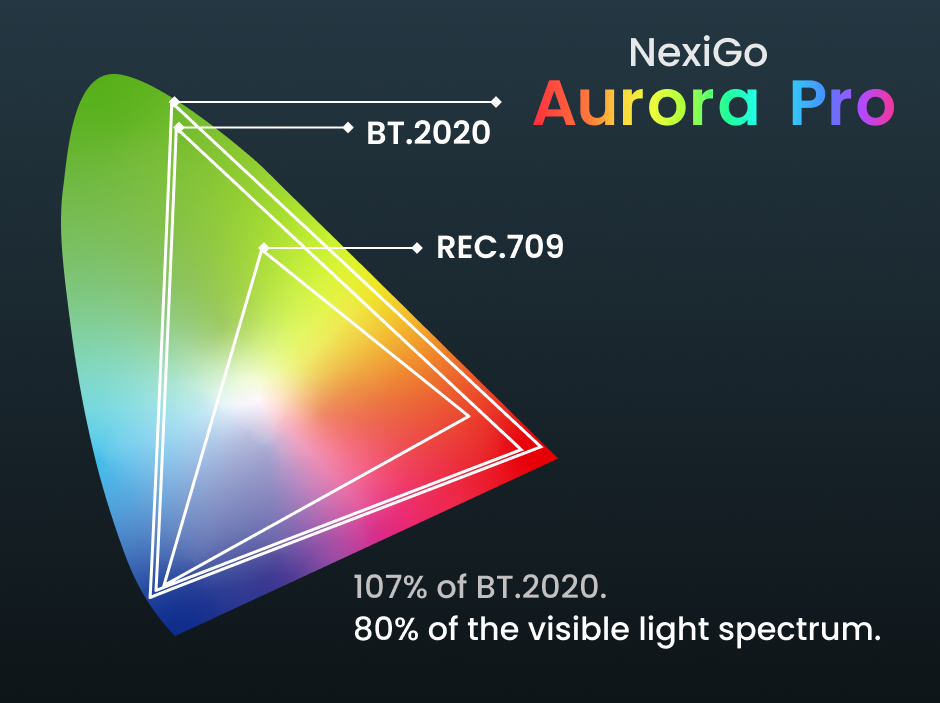
BT.2020 is one of the widest color gamuts used for displays. It reproduces 75.8% of all colors the human eye can see.
See also: Color Gamut, DCI-P3, Rec. 709
Burn-in
Burn-in happens when a display is left on a still image too long without any change. That still image will “burn” into the screen, so that you always see a faint impression of the image no matter what you are watching. This is especially common for LCD and LED displays.
See also: Image Artifact, LCD, LED
Burn Spot
Burn spots are discolored splotches that appear on LCD projectors as a result of chronic overheating. Burn spots may be dark, brown, blue, or even multi-colored, depending on whether the excess heat sears the projector lamp, LCD color panel, or the polarizing filter.
See also: Image Artifact, LCD
C
CEC
CEC, also known as "HDMI-CEC" or “Consumer Electronics Control”, is a feature that enables you to control your projector using the remote control of another device (such as a Fire TV Stick), and vice-versa.
Chromatic Aberration
Chromatic aberration, or “color fringing”, is a colorful outline around an object on-screen. It appears when the projector lens fails to focus all colors at the same point. In mild cases, this can be fixed by adjusting the projector focus.
See also: Image Artifact
CLR
CLR stands for “Ceiling Light-Rejecting”. It's a type of screen engineered to block ambient light coming from the ceiling. This increases perceived contrast and brightness while the lights are on. Unlike ALR screens, CLR screens are unable to block ambient light coming from the side. For this reason, they offer the best visual experience at night or in a light-controlled room.
See also: ALR, Lenticular Screen
Color Accuracy
Color accuracy is how close the colors you see on-screen are to the actual colors that the projector is trying to replicate. This difference is measured by amount of change, or "delta-E" (ΔE).
See also: Delta-E
Color Banding
Color banding is an image artifact that happens when a projector lacks the color depth required to render a smooth gradient. Instead, the transition between shades appears as distinct, blocky “bands” of color. You can reduce this effect by increasing the color bit signal on your device.
See also: Image Artifact
Color Calibration
Color calibration is the act of adjusting the color balance of the projector so that the colors are more accurate to the source material.
See also: Color Accuracy
Colorspace
A colorspace is a standardized range of colors that can be digitally reproduced by a projector. BT.2020, DCI-P3, and Rec.709 are all examples of colorspaces.
See also BT.2020, DCI-P3, Rec.709, SDR, HDR
| Colorspace | Supported Dynamic Range | Coverage of Visible Light Spectrum | Common Use |
|---|---|---|---|
| Rec. 709 | SDR | 35.9% | TV shows; Live TV; Most streaming services; Indie games; All movies and TV before 2005 |
| DCI-P3 | SDR, HDR | 53% | Theatrical releases; Disney/Apple/Prime original shows and movies; Most AAA games |
| BT.2020 | SDR, HDR | 75.8% | Major theatrical releases and video games that aim to be a visual spectacle |
Color Temperature
Color temperature describes how warm (reddish) or cool (bluish) an image's white balance appears. Color temperature is measured in Kelvin (K), where lower values (around 3,200K) look warm and amber, like incandescent lighting. Higher values (6,500K and up) look cool and blue, like daylight. Most home theater content is mastered for 6,500K, often labeled "D65" or "Daylight" on calibration menus.
See also: Color Calibration, Color Accuracy
Contrast Ratio
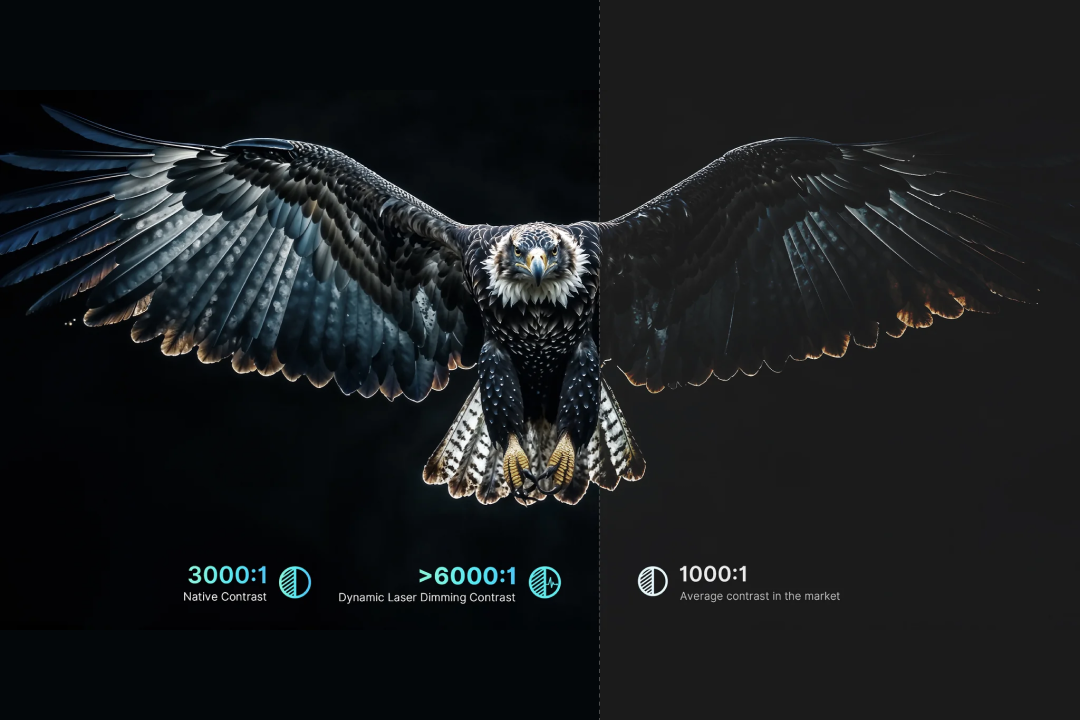
Contrast ratio is the difference between a projector's brightest possible value (white) and its darkest possible value (black). A great contrast ratio is 3,000:1, where the brightest value is 3,000 times brighter than the darkest value.
Contrast Ratio may be measured using the ANSI Contrast or FOFO Contrast method, with ANSI Contrast being more reliable.
See also: ANSI Contrast, Dynamic Contrast, FOFO Contrast, Native Contrast
D
Dark Spot
Dark spots are small black or gray specks on a projected image. They're caused by dust on the projector lens. Most dark spots can be wiped away with a soft microfiber cloth.
See also: Burn Spot, Image Artifact
DCI-P3
DCI-P3 is a wide color gamut that reproduces 25% more colors than sRGB. It’s wider than Rec.709, but narrower than BT.2020. Read more about color gamut here. DCI-P3 is the most common color gamut used for HDR content.
See also BT.2020, Colorspace, HDR, Rec. 709
Dead Pixel
Dead pixels are single pixels that won’t respond even after switching to different content or restarting your projector. Usually dead pixels are white, but they can also be black, red, green, or blue.
See also: Image Artifact
Delta-E (ΔE or dE)
ΔE is a measure of color accuracy on a projector or other display, where ΔE=0 is a perfectly accurate color with no change from the source material. The higher this number, the less accurate color reproduction is on that display. A difference of ΔE<3 is considered to be imperceptible to the human eye, although some experts can tell the difference in color when ΔE is as low as 1.
See also: Color Accuracy
Digital Noise
Digital noise is a grainy film-like effect that can occur in dark scenes. It can be reduced by using the Digital Noise Reduction (DNR) feature on your device.
See also: DNR, Image Artifact
DLP
DLP, or “Digital Light Processing”, is a light projection technology that uses a spinning color wheel to recreate color. Using alternating red, green, and blue filters, DLP projectors create complex colors out of white light. The result is realistic colors with a quick response time. However, compared to LCD and LED, there may be more image artifacts, such as the Rainbow Effect (RBE) and the Screen-Door Effect.
See also: Image Artifact, LCD, LED, RBE, Screen-Door Effect
DNR
DNR, or “Digital Noise Reduction”, is a feature that reduces graininess in dark scenes by comparing multiple frames to find and remove the stray pixels that don't belong. There are two types of DNR: 2D noise reduction and 3D noise reduction.
2D noise reduction compares two frames at a time. This smooths out the image, but may cause some motion blur, since it can’t track movement over time.
3D Noise reduction compares many frames at once. As a result, you'll get less motion blur but more latency.
See also: Digital Noise, Latency, Motion Blur
Dolby Atmos
Dolby Atmos is a widely popular surround sound technology that integrates with projectors, gaming consoles, and streaming platforms.
See also: dts:X
Dolby Audio
Dolby Audio is an audio-enhancing software that comes built-in to projectors and TVs. Dolby Audio has many features that help to provide clear dialogue and lossless audio quality. It also smooths out volume leveling, making the volume difference less jarring when you switch channels or cut to commercial break.
Dolby Vision
Dolby Vision is an HDR technology that improves color, contrast, and overall detail on your projector through better brightness control.
See also: HDR
Dts:X
dts:X is a surround sound technology that adapts to any speaker layout. Unlike Dolby Atmos, it’s usually limited to select devices and Blu-ray discs. However, fans of dts:X prefer it for its flexibility and low audio compression.
See also: Dolby Atmos
Dynamic Black
Dynamic Black, or "dynamic laser dimming", is a contrast-enhancing feature for laser projectors that selectively dims the laser in dark scenes. By adjusting the amount of light used to create each individual frame, Dynamic Black deepens shadows, preserves colors, and brings out lost details.
See also: Black Level, Dynamic Contrast
Dynamic Contrast
Dynamic contrast is the contrast ratio of a display after it has been enhanced by software. While methods vary, the goal of all dynamic contrast software is the same: deepen shadows and amplify highlights without losing any detail.
See also: Contrast Ratio, Dynamic Black, Dynamic Iris, Native Contrast
Dynamic Iris
Dynamic Iris is a contrast-enhancing feature that selectively widens or narrows the projector lens based on the content on-screen. It widens the lens to allow more light through in bright scenes and narrows the lens to let less light through in dark scenes. This results in higher contrast across all scenes.
See also: Dynamic Contrast
E
EDID
EDID, or “Extended Display Identification Data”, is information an HDMI device uses to make sure everything is displayed correctly. EDID includes the resolution, colorspace, and manufacturer of your projector or display.
See also: Colorspace
EOTF
EOTF, or “Electro-Optical Transfer Function”, controls how bright a scene looks. It's the formula that your projector uses to turn electrical signal into visible light. Gamma is an older type of EOTF that's only used for SDR displays.
See also: SDR
F
FOFO Contrast
FOFO Contrast is a method of measuring the contrast ratio of a projector or other display. FOFO stands for “full-on, full-off”, which is a description of how you take the measurement. To measure FOFO Contrast, you measure the brightness of a fully white screen (“full-on”) and compare it to a fully black screen (“full-off”).
FOFO Contrast is considered less trustworthy than other methods of measuring contrast, since it does not represent actual viewing conditions. With normal viewing, light and dark values will be on the screen at the same time, and light areas will bleed into dark areas, lowering the contrast ratio. ANSI Contrast is a more trustworthy way to measure contrast.
See also: ANSI Contrast, Contrast Ratio
Framerate
Framerate is a measure of how many frames per second (fps) there are in a video. The higher the framerate, the smoother the video looks. When the framerate is too low, the video appears to stutter or skip. Most movies are filmed in 24 fps, while video games are typically 60 fps or higher for better responsiveness.
See also: Refresh Rate
Fresnel Screen
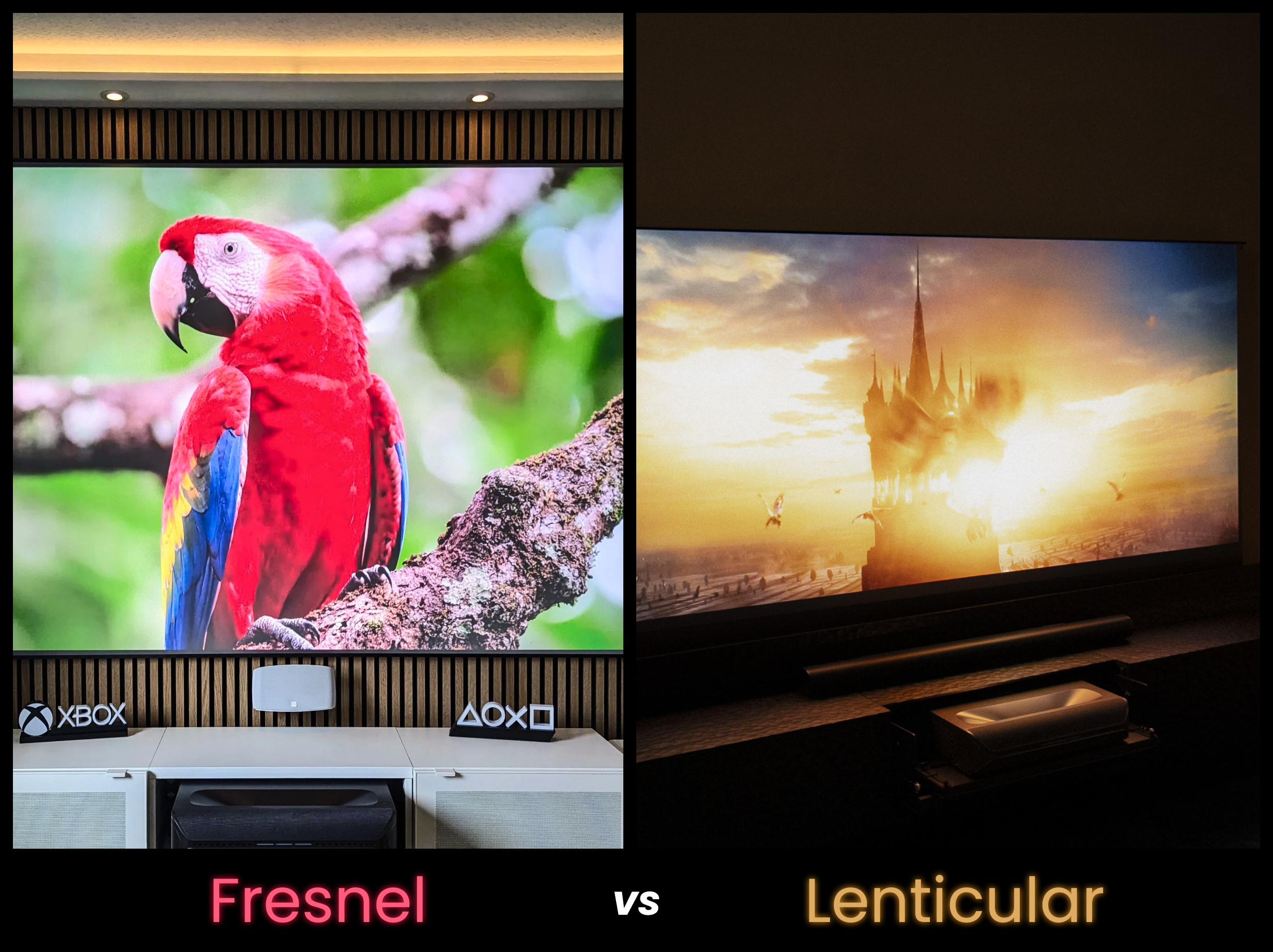
Fresnel screens use micro-textures on the surface of the screen to reject ~85% of ambient light. This improves the contrast and visibility of your projector, especially during the day. Fresnel screens are unique among other light-rejecting screens because they’re able to block all ambient light, not just light coming from the ceiling.
This is made possible by the tiny circular ridges that form the screen’s surface. All surfaces pointing outward towards the walls and ceilings are painted black to absorb light coming from that direction. Meanwhile, the surfaces pointed towards the projector are white to amplify and reflect that light towards the viewer.
See also: ALR, Lenticular Screen
G
Gain / Screen Gain
Screen gain is a measure of how much light is reflected off the screen. The higher the screen gain, the more light is reflected and, as a result, the brighter the projection appears to be.
| Screen Gain | Range | Recommended For |
|---|---|---|
| Low Gain | 0.5–0.9 | Dark rooms; low black levels |
| Neutral Gain | 1.0–1.4 | Balanced brightness and color accuracy; rooms with some ambient light |
| High Gain | 1.5–2.5 | Bright rooms with a lot of ambient light |
H
HDR / HDR10 / HDR10+
HDR, or “high dynamic range”, is a type of video signal with higher color saturation and contrast than standard. There are several types of HDR, including HDR10, HDR10+, Dolby Vision, and HLG.
Although their names are similar, HDR10 and HDR10+ were not developed by the same people. HDR10+ is a newer option with the ability to change picture settings dynamically for individual frames. HDR10, on the other hand, uses static picture settings.
See also: Dolby Vision, HLG, SDR
HLG
HLG, or "hybrid log-gamma", is a type of HDR developed for live broadcasting.
See also: HDR
Hot Spot
A hot spot is a bright spot in the center of your screen. They’re a common issue when combining a UST projector with a high-gain screen.
See also: Image Artifact, Screen Gain, UST
I
Image Artifact / Image Blemish
Image artifacts and image blemishes are colors, lines, and textures on your projector display that are not supposed to be there. Some are fixable, while others are not.
Though the terms are sometimes used interchangeably, “Image artifact” refers to an issue inherent to the projector. An example is rainbow effect, which is a result of the refresh rate of the projector not matching the refresh rate of your eyes.
“Image blemish” refers to an issue caused by manufacturing error or improper use. An example is a burn spot, which may be the result of poor cooling systems or leaving the projector on for too long.
See also: Burn-in, Burn Spot, Chromatic Aberration, Color Banding, Dark Spot, Dead Pixel, Digital Noise, Hot Spot, Laser Speckle, Motion Blur, Rainbow Effect, Screen-Door Effect, Soft Corners
| Image Artifact | Cause | Fixable? |
|---|---|---|
| Burn spot | Overheating | No |
| Dark spot | Dust on lens | Yes |
| Hot spot | Screen too reflective | Yes |
| Dead pixel | Manufacturing defect or aging components | Maybe |
| Laser speckle | Textured projector screen | Yes |
| Chromatic aberration | Poor focus | Maybe |
| Rainbow effect | Refresh rate issue | No |
IR Remote
IR remotes, or "infrared remotes", are remotes that need to be pointed towards the projector in order to work.
See also: Bluetooth Remote
ISO Lumens
ISO Lumens are a standard measurement of brightness on a projector or other display. ISO stands for "International Organization for Standardization". Like ANSI Lumens, ISO Lumens are measured across 9 screen sections. Unlike ANSI Lumens, ISO Lumens also have strict requirements for testing conditions — including ambient temperature, humidity, and how long the projector has been on when measurements are taken.
See also: ANSI Lumens, Lumens
K
Keystone Correction
Keystone correction is a method for digitally fixing distortion on a projector.
L
Lamp Life
Lamp life refers to the typical lifespan of a projector before the light source burns out.
Laser
Laser is a projector light source known for its extremely high vibrance, brightness, and color accuracy. Unlike other light sources, laser projectors use a pure, concentrated beam of light.
See also: DLP, LCD, LED
Laser Speckle
Laser speckle is a TV static-like texture that appears when the laser from your projector hits the surface of the screen and scatters.
See also: Image Artifact
Latency
Latency, sometimes referred to as “lag” or “input lag”, is a measure of the delay between the time it takes for a signal to get from a source (such as a gaming console or streaming stick) to your projector display. Latency is measured in milliseconds.
| Latency Level | Measurement | How It Feels |
|---|---|---|
| Ultra-low | Under 20 ms | Seamless |
| Low | 20–50 ms | Smooth for competitive gaming; seamless for casual gaming and streaming |
| Acceptable | 51–100 ms | Acceptable for casual gaming, but too unresponsive for competitive gaming. Smooth for streaming. |
| High | Over 100 ms | Noticeably stutters while gaming, with long pauses before the player character reacts to your movements. Acceptable for streaming. |
LCD
LCD, or “liquid crystal display”, is a projector light source known for their high color accuracy and low price. LCD projectors use panels that burn out over time and will need to be replaced more often than their LED or Laser counterparts.
See also: Laser, LED
LED
LED, or “light-emitting diodes”, is a projector light source known for its energy efficiency and long lifespan. LED projectors use clusters of diodes to produce light, which can result in lower brightness than Laser projectors.
See also: Laser, LCD
Lens Shift
Lens shift is a feature that repositions the projected image without moving the projector itself. The lens shifts the image up, down, or side-to-side to give you flexibility on where you can place your proejctor. Lens shift is measured as a percentage of screen height/width (For example, ±10% vertical).
See also: Offset, Keystone Correction
Lenticular Screen
Lenticular screens use a microscopic sawtooth texture on the surface of the screen to reject ambient light coming from the ceiling. This increases contrast when you have the lights on.
See also: CLR, Fresnel Screen
Long Throw
Long throw or “standard throw” is a projector type that needs to be a long distance from the wall in order to create a large image.
See also: Throw Ratio
Lumens
Lumens are a measure of projector brightness. While generic lumens are unregulated, ISO Lumens and ANSI Lumens are variants with strict testing protocols that make it possible to compare brightness between projectors from different brands.
See also: ANSI Lumens, ISO Lumens
M
MEMC
MEMC, or “motion estimation, motion compensation”, is a feature that reduces motion blur by predicting motion and adding extra frames in between.
See also: Motion Blur
Motion Blur
Motion blur is a blurry streak that follows moving objects in a video. It's especially common in video games and action movies, where movements are quick. Motion blur can be fixed by enabling MEMC in the settings.
See also: Image Artifact, MEMC
N
Native Contrast
Native contrast is the contrast ratio of a projector or other display without any software enhancements.
See also: Contrast Ratio, Dynamic Contrast
Native Resolution
Native resolution is the resolution supported by a projector before any upscaling. If a projector has a native resolution of 1080p and supports 4K, that means the projector has the pixels of a 1080p projector, but 4K movies and games will still look good.
See also: Upscaling
O
OSD
OSD, or "on-screen display", is the settings menu overlay you can pull up while you're watching something on your projector.
Offset
Projector offset is the vertical distance between the center of the projector lens and the edge of the projected image. If you know the offset of your projector, you will be able to determine the correct height to mount your screen.
R
Rainbow Effect
Rainbow effect, also known as RBE, is an image artifact that looks like rainbows moving across the screen. Rainbow effect is caused by a mismatch in framerate between the projector and your eyes. In mild cases, it may look like a colorful double image that only appears during fast scenes or when you move your eyes across the screen. In more extreme cases, you can see visible bands of color on your image that remain static or roll across the screen.
See also: Image Artifact, Refresh Rate
Rec.709
Rec. 709 is the gamut of color used by SDR content. It covers approximately 35.9% of the visible light spectrum, and it’s the gold standard for broadcasting.
See also: Colorspace, SDR
Refresh Rate
Refresh rate is a measure of how many times per second the screen updates the displayed image. Although refresh rate is measured in Hertz (Hz), you can convert Hz directly into seconds. For example, a 60 Hz refresh rate can display a maximum of 60 frames per second (fps).
See also: Framerate
RGB
RGB stands for "red, green, and blue". These are the primary colors of light that can be mixed to make any other color. Mixing all three at full brightness makes white.
S
SAE
SAE, or Scene Adapt Engine, a next-generation image processing system developed by NexiGo. Trained on over 50,000 hours of raw movie data, it’s designed to enhance visual quality through intelligent, real-time frame analysis.
SAE analyses movement and predicts the next frame, using this information to smooth transitions, reduce motion blur, and optimize picture quality. It also increases contrast in dark scenes, bringing out details that were lost in the shadows.
See also: Motion Blur
Screen Door Effect
Screen door effect is a visible black grid between pixels. This phenomenon is most common for low-resolution and DLP projectors, though it’s less noticeable at smaller screen sizes.
See also: Image Artifact
SDR
SDR, or “standard dynamic range”, is a video signal with industry-standard color and contrast. This is compared to HDR, or “high dynamic range”, which features enhanced color and contrast.
See also: HDR
Short Throw
Short throw is a projector type that can be close to the wall and still create a large image.
See also: Throw Ratio
Soft Corners
Soft corners are unfocused corners of a projector screen, caused by an extreme distance between top and and bottom of the screen. They most commonly appear on UST projectors.
See also: Image Artifact, UST
Spatial Audio / Surround Sound
Spatial audio, or Surround Sound, is an audio feature that makes sound feel like it inhabits a 3-dimensional space. Spatial audio may be a simple left-to-right that you hear when you use headphones or a sound bar. Or it could be surround sound, a multi-speaker setup that creates 360° coverage.
sRGB
sRGB is a standard colorspace for the web, monitors, and printers. It covers a similar range of color to the Rec.709 colorspace.
See also: Colorspace, Rec.709, RGB
T
Throw Distance
Throw distance is the distance between a projector and the wall or screen that it’s projecting onto. Throw distance is usually used in combination with throw ratio to describe the exact distance the projector needs in order to achieve a certain screen size.
See also: Throw Ratio
Throw Ratio
Throw ratio is the ratio between the projector’s distance from the wall and the width of the projected image. It determines how far the projector needs to be from the screen in order to create the image size you want.
See also: Long Throw, Short Throw, Throw Distance, UST
| Throw Type | Throw Ratio | Throw Distance for 100” Screen |
|---|---|---|
| Ultra-short | Under 0.5:1 | Less than 18 in. (<45 cm) |
| Short | 0.5:1 – 1:1 | 18–87 in. (45–220 cm) |
| Long or standard | Over 1:1 | Over 87 in. (>220 cm) |
Tri-Color
Tri-Color is a method of color reproduction in projectors that uses three sources of colored light (RGB). This results in higher color accuracy and lower rainbow effect than traditional color reproduction, which uses a single white light source that passes through multiple color filters.
Tri-color projectors may use laser (tri-color laser), LED (tri-color LED), or a hybrid (such as the tri-LED-laser used by the NexiGo TriVision Ultra).
See also: RGB
True Black
True black is the darkest possible black value.
See also: Black Level
U
Upscaling
Upscaling is when a projector alters content in a different resolution to make it look better on-screen. To display low resolution content, projectors often smooth the edges and generate new pixels using AI. To display high resolution content, projectors often use pixel shifting — rapidly shifting pixels around to trick the human eye into seeing a higher resolution image.
See also: Native Resolution
UST
UST, or ultra-short throw, is a projector with a throw ratio so small that the projector only needs to be a few inches from the wall to get a large screen.
See also: Throw Ratio
Z
Zoom
Zoom is a method of shrinking the screen to a smaller size without moving the projector. Though convenient, this feature lowers the overall resolution of your projector.
Are there more terms you want defined? Drop us a line.
Did we miss something? Send us your questions and suggestions on Instagram or email our support team at cs@nexigo.com.
Like what we do? Stay tuned for more.
Whether you work at home or in the office, NexiGo provides a wide range of quality and affordable technology to elevate your daily life. Our products encompass everything from webcams and portable monitors to projectors and gaming accessories.
Articles we think you'll love