



Support
Chapters:
00:00 Introduction
00:22 How do I connect it to my Switch?
00:25 Method 1: Connect via USB-C to USB-C cable
01:04 Method 2: Connect via Bluetooth
01:24 How do I fix stick drift?
01:53 What is the average margin of error for this controller?
02:15 How to change the color of the RGB lights?
02:51 How do I program the mappable buttons?
03:24 How do I reset the mappable buttons?
03:56 How do I use the Turbo function?
04:29 How do I adjust the speed of the Turbo function?
04:44 How do I adjust the vibration level?
05:13 Does this controller have motion controls?
05:24 How do I connect it to my PC?
05:27 Method 1: Wireless connection
05:48 Method 2: Wired connection
06:22 How do I connect it to my smartphone?
06:25 For Android devices
06:43 For iOS devices
07:01 How long does the battery last?
Yes, it is fully compatible with Nintendo Switch 2, Switch, and Switch OLED. It also supports Windows PC (7+), iOS (13+), and Android (6.0+) devices seamlessly.
Yes. For the first use, connect the controller using the included USB charging cable to pair it. After the initial pairing, simply press the Home button to wake up the controller, and it will automatically reconnect to the last paired device.
Yes, it offers 4 customizable vibration levels (Off / 30% / 75% / 100%). To adjust, press and hold the L, ZL, R, and ZR buttons simultaneously for 3 seconds.
TURBO FUNCTION TUTORIAL
Many of the buttons on this controller can be set to turbo functionality. The buttons capable of using the turbo function are: A / B / X / Y / R / L / ZL / ZR. The semi-autoturbo, full-auto turbo, remove, and turbo burst speed settings can be set through the Turbo button.

1. Press and hold the one of the above buttons, then press the Turbo button and release to enable the semi-auto turbo function. The semi-auto turbo function means that if you press one of the A / B / X / Y / R / L / ZL / ZR buttons which you set, you will repeat the button roles. (If you did not activate the semi-auto turbo function, long-pressing a button equals short-pressing a button and the button role actually works for only one time.)

2. Repeat Step 1 again to enable full-auto mode. This makes it so that your selected button will repeat continuously until you disable turbo mode.
3. Repeat Step 1 for the third time to disable turbo mode.
4. Press and hold the Turbo button for 5 seconds to clear all turbo settings.

ADJUSTING THE LIGHT COLOR
Press the Lighting button to switch the color. Choose between red, orange, yellow, green, cyan, blue, purple, and rainbow.

ADJUSTING THE LIGHT MODE
Double-click the Lighting button to change the light mode. Choose between Rainbow Breathing Mode, RGB Cycling Breathing Mode, and lights off.

ADJUSTING THE BRIGHTNESS
1. Hold down the Up / Down button, then press and hold the Lighting (C) button to enter light adjustment mode.

2. While continuing to hold down the Lighting (C) button, tap the Up / Down buttons to increase/decrease the brightness

If your controller is not showing a charging indicator, please follow these steps to perform a quick hardware reset:
Step 1: Locate the small Reset button on the back of the controller.
Step 2: Insert a thin pin or a straightened paperclip into the hole and press down for a few seconds.
This should reset the device and restore normal charging and functionality. If the issue persists and the indicator still won't turn on, please reach out to our Customer Support team immediately, and we will be happy to assist you further.
Unless you have issues with the camera, we don't recommend any firmware updates. If you are not sure about if updates are needed, please contact our customer support cs@nexigo.com.


Support
Chapters
00:00 Introduction
00:12 How do I connect it to my Switch?
00:15 Method 1: Connect via USB-C to USB-C cable
00:54 Method 2: Connect via Bluetooth
01:14 How do I replace the thumbstick caps?
01:30 How do I fix stick drift?
01:59 What is the average margin of error for this controller?
02:21 How to change the color of the RGB lights?
02:57 How do I program the mappable buttons?
03:29 How do I reset the mappable buttons?
04:02 How do I use the Turbo function?
04:35 How do I adjust the speed of the Turbo function?
04:50 How do I adjust the vibration level?
05:20 Does this controller have motion controls?
05:30 How do I connect it to my PC?
05:33 Method 1: Wireless connection
05:54 Method 2: Wired connection
06:28 How do I connect it to my smartphone?
06:31 For Android devices
06:49 For iOS devices
07:07 How long does the battery last?
Yes, it is fully compatible with Nintendo Switch 2, Switch, and Switch OLED. It also supports Windows PC (7+), iOS (13+), and Android (6.0+) devices seamlessly.
Yes. For the first use, connect the controller using the included USB charging cable to pair it. After the initial pairing, simply press the Home button to wake up the controller, and it will automatically reconnect to the last paired device.
Yes, it offers 4 customizable vibration levels (Off / 30% / 75% / 100%). To adjust, press and hold the L, ZL, R, and ZR buttons simultaneously for 3 seconds.
TURBO FUNCTION TUTORIAL
Many of the buttons on this controller can be set to turbo functionality. The buttons capable of using the turbo function are: A / B / X / Y / R / L / ZL / ZR. The semi-autoturbo, full-auto turbo, remove, and turbo burst speed settings can be set through the Turbo button.

1. Press and hold the one of the above buttons, then press the Turbo button and release to enable the semi-auto turbo function. The semi-auto turbo function means that if you press one of the A / B / X / Y / R / L / ZL / ZR buttons which you set, you will repeat the button roles. (If you did not activate the semi-auto turbo function, long-pressing a button equals short-pressing a button and the button role actually works for only one time.)
2. Repeat Step 1 again to enable full-auto mode. This makes it so that your selected button will repeat continuously until you disable turbo mode.
3. Repeat Step 1 for the third time to disable turbo mode.
4. Press and hold the Turbo button for 5 seconds to clear all turbo settings.

ADJUSTING THE LIGHT COLOR
Press the Lighting button to switch the color. Choose between red, orange, yellow, green, cyan, blue, purple, and rainbow.
ADJUSTING THE LIGHT MODE
Double-click the Lighting button to change the light mode. Choose between Rainbow Breathing Mode, RGB Cycling Breathing Mode, and lights off.
ADJUSTING THE BRIGHTNESS
1. Hold down the Up / Down button, then press and hold the Lighting (C) button to enter light adjustment mode.
2. While continuing to hold down the Lighting (C) button, tap the Up / Down buttons to increase / decrease the brightness
If your controller is not showing a charging indicator, please follow these steps to perform a quick hardware reset:
Step 1: Locate the small Reset button on the back of the controller.
Step 2: Insert a thin pin or a straightened paperclip into the hole and press down for a few seconds.
This should reset the device and restore normal charging and functionality. If the issue persists and the indicator still won't turn on, please reach out to our Customer Support team immediately, and we will be happy to assist you further.
Unless you have issues with the camera, we don't recommend any firmware updates. If you are not sure about if updates are needed, please contact our customer support cs@nexigo.com.
Step 1
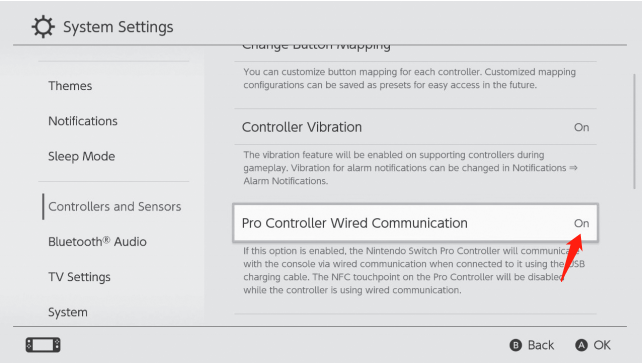
Please enable the Pro Controller Wired Communication setting in the Switch / Switch OLED console itself. You can do this by going to System Settings > Controller and Sensors > Pro Controller Wired Communication. Set the Pro Controller Wired Communication to On.

Step 2
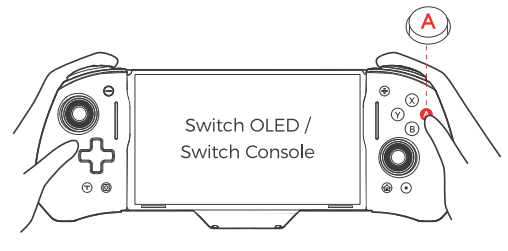
Slide the Switch OLED console into the controller and plug it into the USB-C port at the bottom.
Note (for Switch OLED): The charging port won't line up perfectly due to the OLED's larger size. While sliding in the console, please push/pull the bottom of the console to ensure a proper connection.

Step 3
After you have done so, press the A button on the controller to connect it to the console.
Tap the "Lighting" button to switch between different colors. And double-tap to switch between lighting modes.
Yes, but ONLY use the original Switch / Switch OLED power adapter to charge the controller.
Yes, it’s equipped with a six-axis gyroscope, allowing it to capture your movements quickly and accurately.