

Wireless Controller for Switch 2/Switch/OLED

$31.99

Shipping calculated at checkout.

  • Vibrant RGB lighting & aesthetics
  • Programmable back buttons
  • Immersive vibrations & motion control
  • Fast charging & ergonomic design
  • Versatile connectivity & instant wake-up

Style: Regular

  • Regular
  • Hall Stick

Color: Cosmic Nebula

  • Cosmic Nebula
  • Cotton Candy
  • Green Geode
  • Retro Wave
$31.99
Out of stock
Two NS32 Gen 2 wireless controllers on a space rock background.Two NS32 Gen 2 wireless controllers on a space rock background.
Key features and selling points of wireless Bluetooth controller.
Front view of NS32 controller with stunning backlit faceplate.
NexiGo Wireless Pro Controller with 2 rear programmable buttons.
Front & rear views of hand holding Hall Effect controller grips.
Wireless Controller tilting with a racing game background.
NexiGo wireless controller tilted with an FPS game background.
Dual vibration motors HD rumble vibrating rocks around the controller.
Rear view of Bluetooth controller with charging cable inserting.
Family of three having fun with NexiGo NS32 controllers.
Bluetooth wireless connection steps for this wireless controller.
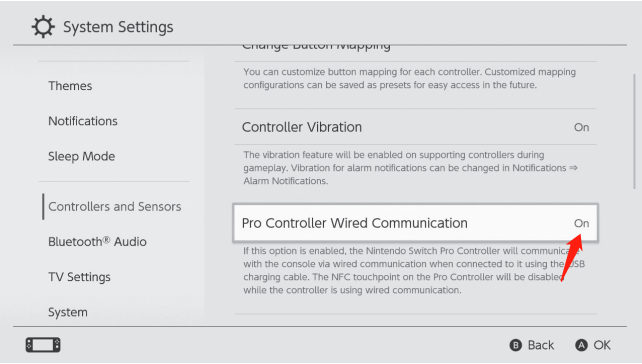
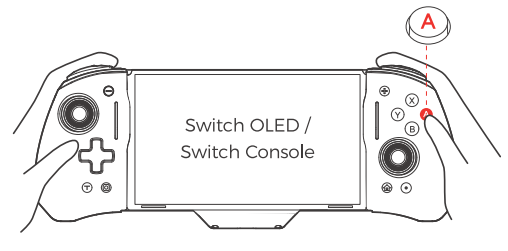
Wired connection steps for this wireless controller.
A couple gaming competitively with NexiGo NS32 Switch controllers.

Support

Chapters:

00:00 Introduction
00:22 How do I connect it to my Switch?
00:25 Method 1: Connect via USB-C to USB-C cable
01:04 Method 2: Connect via Bluetooth
01:24 How do I fix stick drift?
01:53 What is the average margin of error for this controller?
02:15 How to change the color of the RGB lights?
02:51 How do I program the mappable buttons?
03:24 How do I reset the mappable buttons?
03:56 How do I use the Turbo function?
04:29 How do I adjust the speed of the Turbo function?
04:44 How do I adjust the vibration level?
05:13 Does this controller have motion controls?
05:24 How do I connect it to my PC?
05:27 Method 1: Wireless connection
05:48 Method 2: Wired connection
06:22 How do I connect it to my smartphone?
06:25 For Android devices
06:43 For iOS devices
07:01 How long does the battery last?

NexiGo Bluetooth Controller Standing Among Flowers Under a Pink Sky
Front view of NS32 controller with stunning backlit faceplate.
NexiGo Wireless Pro Controller with 2 rear programmable buttons.
Wireless Controller tilting with a racing game background.
Close-Up of the Wireless Controller’s Turbo Button with a Shooting Game in the Background
Wireless Controller Above Pink Clouds with Internal Vibration Motor Visible
NexiGo Wireless Controller Charging on a Pink Pad
Hand Holding a Wireless Controller with a Comfortable, Streamlined Design and Textured Grips
Bluetooth wireless connection steps for this wireless controller.
NexiGo Hall Effect controller standing on a space rock.Key features and selling points of wireless Bluetooth controller.
Exploded view of wireless controller Hall Effect thumbsticks.
Front view of NS32 Hall Effect controller with backlit faceplate.
NexiGo Wireless Pro Controller with 2 rear programmable buttons.
Wireless Pro Controller tilting with a racing game background.
NexiGo wireless controller tilted with an FPS game background.
Dual vibration motors HD rumble vibrating rocks around the controller.
Rear view of Bluetooth controller with charging cable inserting.
Family of three having fun with NexiGo NS32 controllers.
Bluetooth wireless connection steps for this wireless controller.
Wired connection steps for this wireless controller.
A couple gaming competitively with NexiGo NS32 Switch controllers.

Support

Chapters

00:00 Introduction
00:12 How do I connect it to my Switch?
00:15 Method 1: Connect via USB-C to USB-C cable
00:54 Method 2: Connect via Bluetooth
01:14 How do I replace the thumbstick caps?
01:30 How do I fix stick drift?
01:59 What is the average margin of error for this controller?
02:21 How to change the color of the RGB lights?
02:57 How do I program the mappable buttons?
03:29 How do I reset the mappable buttons?
04:02 How do I use the Turbo function?
04:35 How do I adjust the speed of the Turbo function?
04:50 How do I adjust the vibration level?
05:20 Does this controller have motion controls?
05:30 How do I connect it to my PC?
05:33 Method 1: Wireless connection
05:54 Method 2: Wired connection
06:28 How do I connect it to my smartphone?
06:31 For Android devices
06:49 For iOS devices
07:07 How long does the battery last?

What Customers Are Saying

Real-world reviews: “Customizable RGB lighting, superior ergonomic grip, and instant responsiveness.”

Slide 1

Beautiful bright and solid controller

This is that controller! It is very affordable, and yet it still feels and looks very high-quality. First, the controller's RGB lighting is beautiful.

Slide 2

great for PCs

The added RGB light feature is pretty cool, and even when not lit up, I appreciate the colorful case because it helps me differential this controller from my others which are all plain black.

Slide 3

Great colors, great feel, great lights.

The designs on it of space and galaxies is awesome, but when it's on, it lights up from the inside and looks even better.

Slide 4

Awesome controller

The controller itself feels comfortable and solid, and the sticks, buttons, vibration, and motion controls all respond well.

Slide 5

Awesome Customizable Features

One of my favorite features is the customizable RGB lighting. You can choose from 8 different colors, 3 lighting modes, and 4 brightness levels

Slide 6

It can wake the switch 2!

The battery life is very good and it lasts plenty long for my play sessions.

Slide 7

Nice controller with a cool design. No input delays so far.

The RGB backlight is on. Makes it look like the stars are shining. The buttons and triggers feel good too.

Slide 1

Beautiful bright and solid controller

This is that controller! It is very affordable, and yet it still feels and looks very high-quality. First, the controller's RGB lighting is beautiful.

Slide 2

great for PCs

The added RGB light feature is pretty cool, and even when not lit up, I appreciate the colorful case because it helps me differential this controller from my others which are all plain black.

Slide 3

Great colors, great feel, great lights.

The designs on it of space and galaxies is awesome, but when it's on, it lights up from the inside and looks even better.

Slide 4

Awesome controller

The controller itself feels comfortable and solid, and the sticks, buttons, vibration, and motion controls all respond well.

Slide 5

Awesome Customizable Features

One of my favorite features is the customizable RGB lighting. You can choose from 8 different colors, 3 lighting modes, and 4 brightness levels

Slide 6

It can wake the switch 2!

The battery life is very good and it lasts plenty long for my play sessions.

Slide 7

Nice controller with a cool design. No input delays so far.

The RGB backlight is on. Makes it look like the stars are shining. The buttons and triggers feel good too.

Slide 7

Nice controller with a cool design. No input delays so far.

The RGB backlight is on. Makes it look like the stars are shining. The buttons and triggers feel good too.
Sunday,Monday,Tuesday,Wednesday,Thursday,Friday,Saturday
January,February,March,April,May,June,July,August,September,October,November,December
Not enough items available. Only [max] left.
Add to WishlistBrowse WishlistRemove Wishlist
Shopping cart

Your cart is empty.

Return To Shop

Add Order Note Edit Order Note
Estimate Shipping
Add A Coupon

Estimate Shipping

Add A Coupon

Coupon code will work on checkout page


My Wishlist

Loding your saved items

Don't lose your wishlist!

My Wishlist

Loding your saved items

Don't lose your wishlist!