



The World's First
4K Tri-LED-Laser Projector with Dolby Vision

Estimated Shipment Time:
Estimated Shipment Time: After placing your order, your item is set to ship in late November. Stay informed by signing up for our newsletter to receive the latest updates.
Estimated Shipment Time:


Unlock true-to-life visuals with vibrant colors and enhanced contrast


Experience dazzling detail and breathtaking color with Dolby Vision.
Enjoy enhanced contrast with HDR10+. With this technology, dark shadows reveal subtle nuances, while bright highlights shine with exceptional clarity.
Combining six different light sources, our Tri-LED-Laser technology delivers an unparalleled visual experience with 110% coverage of the BT.2020 color gamut.

Harnessing the power of Tri-LED and Tri-Color Lasers for unparalleled color depth

Experience up to 10,000:1 FoFo contrast for deeper blacks and enhanced image depth. When the scene goes dark, so does the projector with Full Fade to Black support.

Advanced laser technology eliminates speckling for smooth, clear images and immersive viewing.

Cutting-edge optics remove color fringing for sharp, accurate edges and high image quality.

Enjoy 2,600 ANSI Lumens for ultra-bright visuals in any lighting condition, day or night.

Explore a broader color range with 110% BT.2020 coverage for more vibrant imagery.

Achieve studio-grade color accuracy with △E<1 for precise and consistent color reproduction.


Advanced laser technology eliminates speckling for smooth, clear images and immersive viewing.
Experience up to 10,000:1 FoFo contrast for deeper blacks and enhanced image depth. When the scene goes dark, so does the projector with Full Fade to Black support.
Advanced laser technology eliminates speckling for smooth, clear images and immersive viewing.
Cutting-edge optics remove color fringing for sharp, accurate edges and high image quality.
Enjoy 2,600 ANSI Lumens for ultra-bright visuals in any lighting condition, day or night.
Explore a broader color range with 110% BT.2020 coverage for more vibrant imagery.
Achieve studio-grade color accuracy with △E<1 for precise and consistent color reproduction.
Harnessing the power of Tri-LED and Tri-Color Lasers for unparalleled color depth.

Advanced laser technology eliminates speckling for smooth, clear images and immersive viewing.

Cutting-edge optics remove color fringing for sharp, accurate edges and high image quality.

Enjoy 2,600 ANSI Lumens for ultra-bright visuals in any lighting condition, day or night.

Explore a broader color range with 110% BT.2020 coverage for more vibrant imagery.

Achieve studio-grade color accuracy with △E<1 for precise and consistent color reproduction.

Experience color the way the director intended. Every NexiGo TriVision Ultra is shipped with pre-tuned sRGB to an average Delta-E (△E)< 1.
Enjoy exceptional out-of-the-box color accuracy that brings your favorite movies and TV shows to life.


Experience captivating visuals with 2,600 Lumens for exceptional brightness and lifelike images in any lighting conditions.

Enjoy your favorite content on the go with a portable design.
Dimensions
Weight


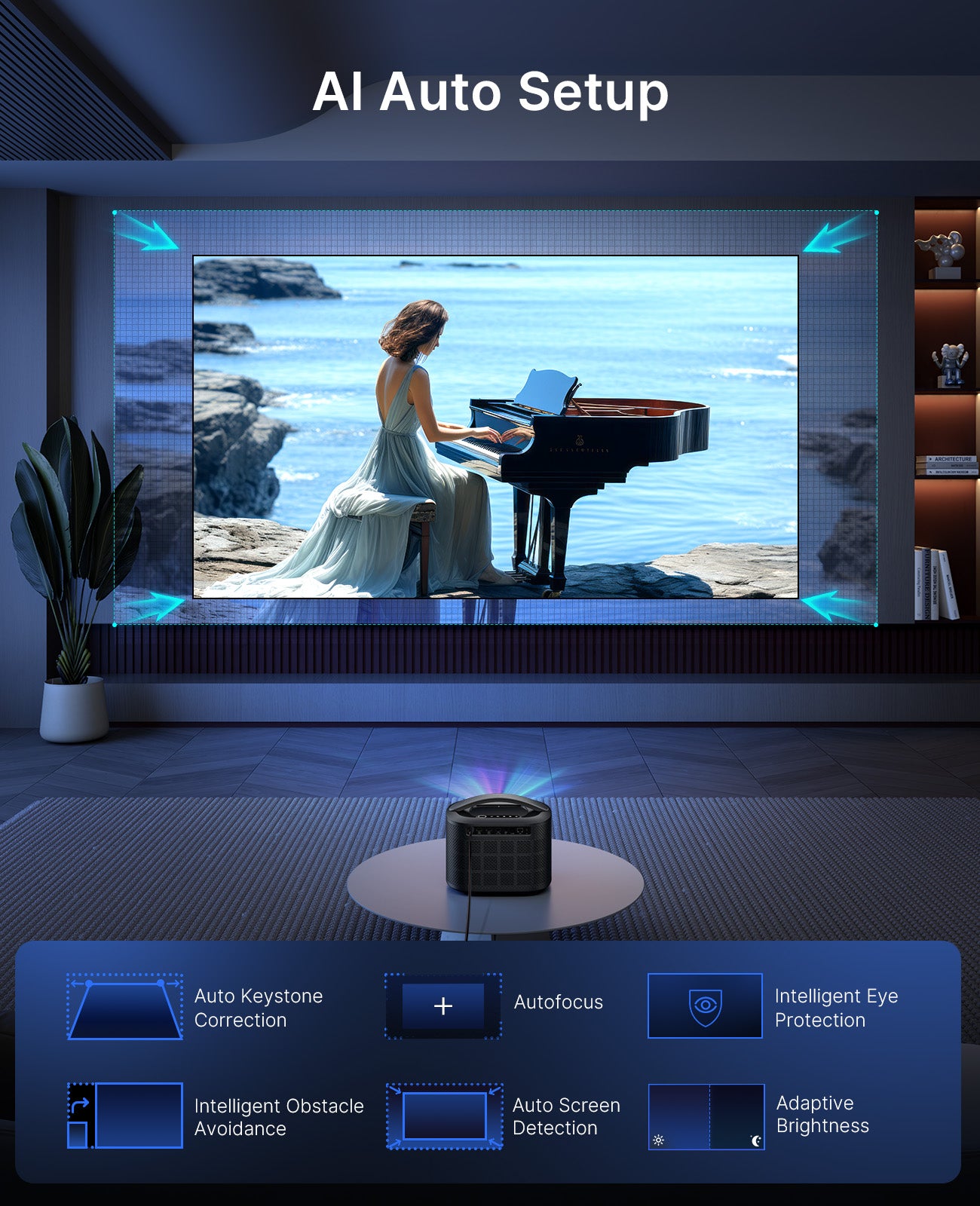
Get a perfectly aligned and focused image in seconds.

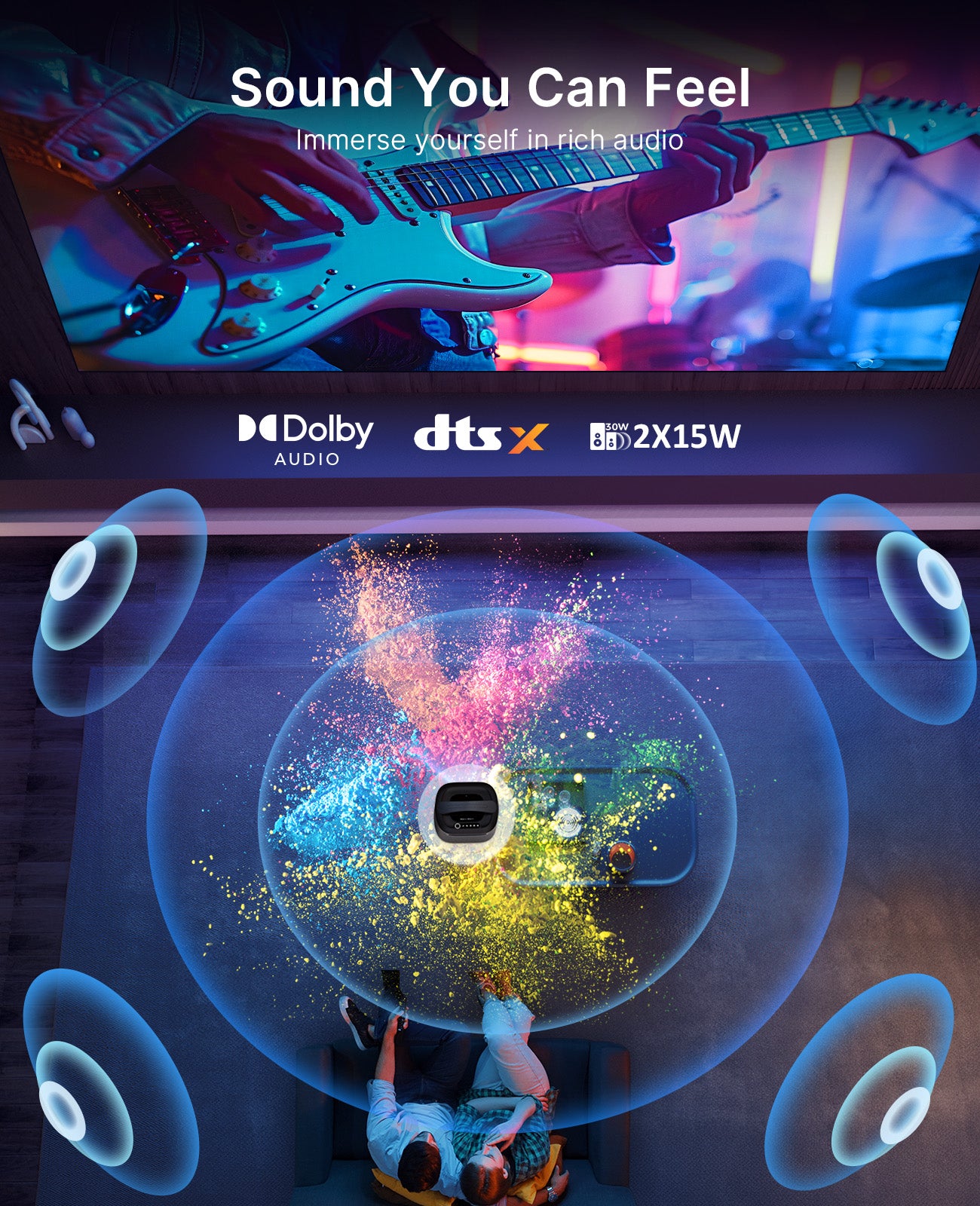
Immerse yourself in rich audio with built-in 30W speakers, enhanced by Dolby Audio & DTS Virtual support.
Indulge in a flawless gaming experience with ultra-low latency.
4ms Ultra-Low Latency
Delivering up to 2,500 Lumens for brilliant visuals

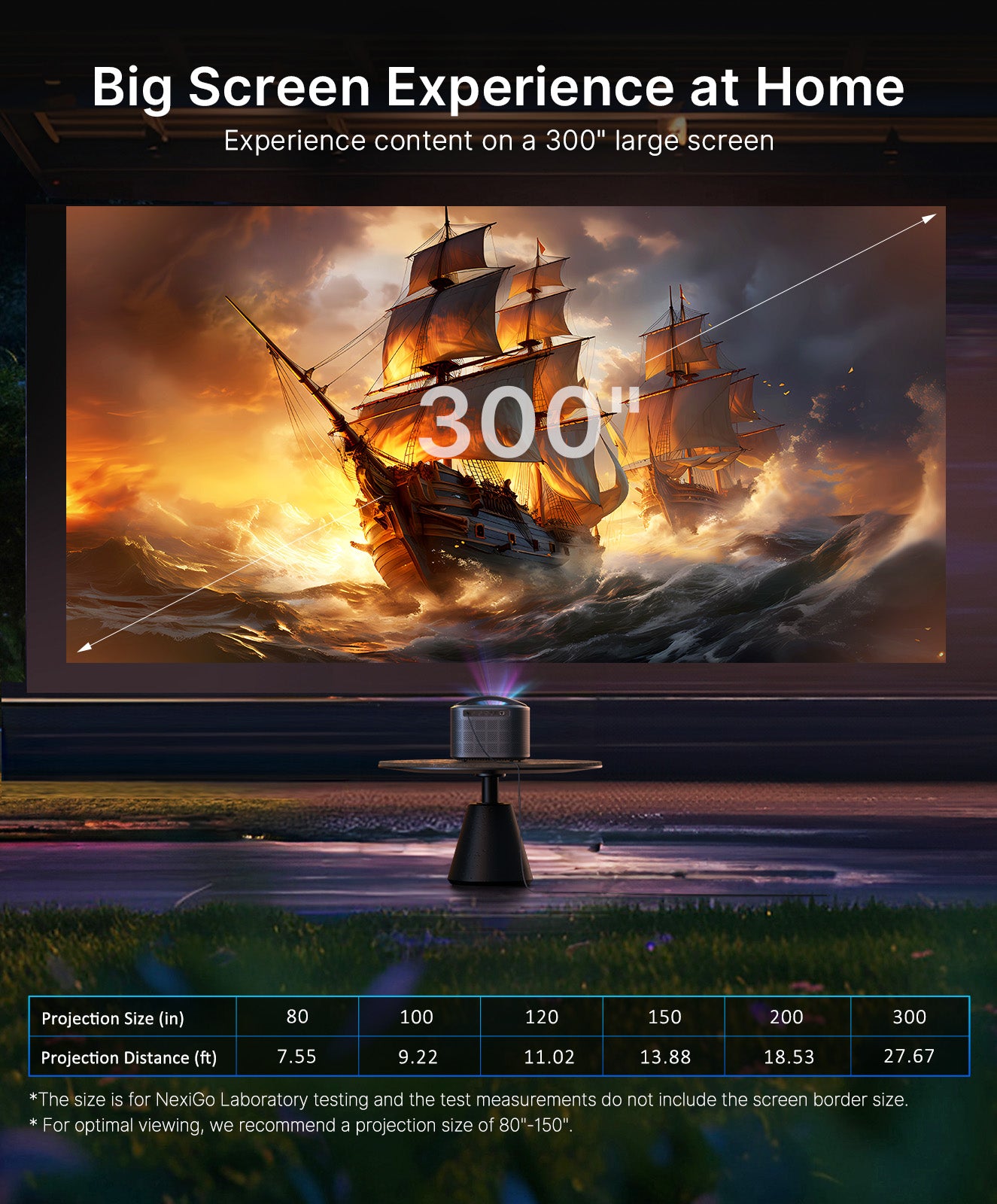
Immerse yourself in content on a sizable screen
4ms Ultra-Low Latency
Delivering up to 2,500 Lumens for brilliant visuals


The TriVision Ultra operates at a whisper-quiet level under 28dB, ensuring your viewing experience remains undisturbed.

Bring your favorite games to life in immersive 3D.

Navigate effortlessly in a dark room.
Experience films just as the director intended. The TriVision Ultra can project at 24 Hz or 50 Hz to match the original frame rate.

Enjoy fluid action scenes and sports with Intelligent MEMC Motion.

Enjoy versatile connectivity with HDMI 2.1 for stunning high-definition content, Wi-Fi 6 for lightning-fast streaming, and Bluetooth 5.2 for pairing with soundbars, headphones, and more.

00:00 Introduction
00:08 How do I set up the TriVision Ultra for the first time?
01:05 How do I enable Air Mouse?
01:31 How do I connect the TriVision Ultra to the Internet?
01:48 How do I pair Bluetooth devices?
01:53 - Pairing an Audio Device
02:07 - Using the TriVision Ultra as a Bluetooth Speaker
02:20 How do I adjust the focus?
02:25 - Automatic Focus
02:50 - Manual Focus
03:16 How do I adjust the keystone correction?
03:20 - Automatic Keystone
03:32 - Manual Keystone
04:05 How do I use the Smart Screen Adaptation features?
04:10 - Automatic Obstacle Avoidance
04:30 - Auto Screen Alignment
04:50 How do I access my HDMI or USB device?
05:12 How do I install a Fire TV Stick in the TriVision Ultra?
05:47 What are the recommended settings for my device?
05:51 - Fire TV
07:22 - Apple TV
08:15 - NVIDIA Shield Display
09:10 - PS5
10:02 - Xbox
11:03 - Nintendo Switch
11:40 How do I wirelessly cast onto the TriVision Ultra?
11:44 - iOS Devices
11:57 - Mac OS Devices
12:14 - Android Devices
12:26 - Windows Devices
12:39 - DLNA
12:51 How do I game with low latency?
13:11 What is the latency of 4K vs 1080p in Gaming Mode?
13:44 How do I play 3D content?
13:48 - Option 1: Watching on a USB Device
14:17 - Option 2: Watching on an HDMI Device
14:46 Does TriVision Ultra support Dolby Vision?
15:06 How do I enable HDR and adjust the image parameters?
15:37 How do I enable 24p and 50p mode?
16:18 What is the recommended HDMI Info?
16:56 What is the best HDMI RGB range?
17:18 Why is there no sound coming from TriVision Ultra?
17:32 How do I disable the CEC shutdown pop-up?
17:53 How do I set the projector to automatically power on to a certain device?
18:15 How do I set up an auto shutdown timer?
18:39 How do I disable eye protection mode?
19:01 How do I update the firmware?
19:20 How do I disable the system update notifications?
19:37 How do I disable the keyboard sound and startup sound?
19:57 How do I remove dust buildup from the TriVision Ultra?
20:10 How do I check the remote control battery level?
20:25 Where do I find the serial number?
20:39 How do I mount the TriVision Ultra to the ceiling?
Yes, the TriVision Ultra is compatible with most projector stands on the market. You can easily find a suitable stand with the following specifications:
Yes, the TriVision Ultra is easy to take outside thanks to its compact size and portable handle. With 2600 Lumens, it delivers a brighter and clearer image than many other projectors, even those designed for outdoor use. However, since it doesn’t have a built-in battery, you’ll need to connect it to a power source.
You can use any regular PVC screen. However, we recommend using a Fresnel ALR for long throw projectors for the best possible experience.
Yes, you can use an anti-glare, ambient light-rejecting screen if it is designed for long-throw projectors. However, if you use one designed for UST projectors, it may reduce the image brightness. For the best experience, please make sure that the screen is specifically designed for long-throw projectors before making your purchase.
Yes, the TriVision Ultra supports ceiling mounting.
1. Remove the four feet on the bottom of the projector to access the mounting screw threads.
2. Find a suitable ceiling mount using the following specifications:
The ceiling mounting holes are M4 x 20 mm in size
9.45" is the diagonal distance between the mounting holes
7.87" is the horizontal distance on the top row
6.89" is the horizontal distance on the bottom row
5.91" is the vertical distance between the top and bottom rows
Note: The measured size may vary based on configuration, manufacturing, and measurement method.

Yes, the TriVision Ultra features Autofocus, Auto Keystone Correction, Auto Screen Detection, Intelligent Obstacle Avoidance, Adaptive Brightness, and Intelligent Eye Protection.
You can set Autofocus and Auto Keystone Correction to run upon startup and/or after moving the projector.
Point the remote control towards the IR sensor on the back of the projector. The angle of the remote control should not must be within ± 15 degrees of the projector's IR sensor and the distance between the remote control and the sensor(s) should not exceed 26 feet (~ 8 meters).
Enable Bluetooth on your TriVision Ultra by going to Settings > Bluetooth Connection > Bluetooth > On.
Please hold the remote within 7.87 inches of the projector. Point it towards the projector and press and hold the Return and Menu buttons simultaneously for at least 10 seconds to put the remote control into pairing mode. lf the pairing is successful, the screen will display the message, "Bluetooth remote control is paired".
Note:
The projector supports 3D Frame Sequential, Frame Packing, Side by Side 3D, and Top & Bottom 3D. To watch 3D movies, you will need a pair of 120Hz active shutter 3D glasses.
Note: 3D Frame Sequential and Frame Packing are only available by HDMI connection.

To connect a soundbar or speaker, you can use one of the methods below, depending on the connection options available on your soundbar.
Option 1: HDMI eARC or ARC (Recommended)
Connect your soundbar or speaker to the HDMI 1 port on the TriVision Ultra using an HDMI cable. Then, go to Settings > Audio Settings > Sound Output Source and select HDMI eARC. For an HDMI ARC compatible soundbar or speaker, you will also need to switch the ARC option to On. This ensures that audio is sent from the projector to the soundbar via HDMl with enhanced capabilities.
Option 2: Optical
Connect your soundbar or speaker to the S/PDIF port on the projector using an optical cable. Then, go to Settings > Audio Settings > Sound Output Source and select S/PDIF.
Option 3: Bluetooth
Enable Bluetooth on your soundbar or speaker and on the TriVision Ultra. On your projector, go to Settings > Bluetooth Connection > Output, then scroll down to Search Device and choose your soundbar from the list of available devices.
If there is no sound coming from TriVision Ultra, you may have selected a different audio output source. Go to Settings > Audio Settings > Sound Output Source and select the Internal Speakers to switch the audio output back to the TriVision Ultra.
| Screen Size (in) | Projection Distance (ft) |
|---|---|
| 80 | 7.55 |
| 90 | 8.48 |
| 100 | 9.22 |
| 120 | 11.02 |
| 150 | 13.88 |
| 200 | 18.53 |
| 300 | 27.67 |
Feel free to leave your questions to us. We will reply you asap!

Image Sensor
1/1.8" Sony® STARVIS 2 back-illuminated sensor
Resolution
(USB 3.0 Output)
MJPEG/H.264
3840 x 2160@30/25/20/15/10/5fps,
1920 x 1080@60/30/25/20/15/10/5fps,
1280 x 720@60/50/30/25/20/15/10/5fps, etc.
YUY2/NV12
1920 x 1080@60/50/30/25/20/15/10/5fps,
1280 x 720@60/50/30/25/20/15/10/5fps, etc.
Resolution
(HDMI Output)
30fps mode
3840 x 2160fps@30/25fps, 1920 x 1080@30/25fps
60fps mode
1920 x 1080@60/50fps, 1280 x 720@60/50fps
Lens
9-layer glass lens, f/2.2 aperture, 4.2 mm focal length
Field of View
D=90°/H=81°/V=55°
Focus Type
Fixed Focus
Focus Range
10" - 90" (0.25m - 2.28m)
Digital Zoom
Up to 10x digital zoom at 4K@30fps
Facial Enhancement
Support
Microphone
Dual noise reduction mics
Mic Pickup Range
Within 32.8ft (10m)
Video Output Port
1 x USB-B, 1 x HDMI
Software
Works with Zoom, Microsoft Teams, Skype for Business, Slack, Webex, and many more
Operating System
Windows 7 (Supports 1080p or lower),
Windows 8.1/10/11 or above
macOS 10.10 or above
Hardware
CPU: 2.4 GHz Intel Core 2 Duo processor or better
RAM: 2 GB or more
USB: USB 2.0, USB 3.0(Recommended)
Display Type: DLP
Light Source Technology: Tri-LED-Laser
Resolution: 4K UHD (3840 x 2160)
Brightness: 2600 Lumens1
Color Gamut: 110% BT.2020
FOFO Contrast Ratio: 1500:1 ~ 10,000:1
Projection Size: 80" to 300"2
Input Lag: 4.2ms~8ms3
Throw Ratio: 1.27:1
RAM / EMMC: 4G / 128G
Support Format: Dolby Vision, HDR10+, HDR10, HLG
MEMC: Yes
3D: Active 3D
Lamp Life: 25000 Hours4
Speakers: 15W x 2
Dolby Audio: Yes
DTS Virtual X: Yes
Bluetooth Speaker Mode: Yes
Noise: ≤ 28dB5
Auto Focus: Yes
Auto Keystone Correction: Yes
Intelligent Obstacle Avoidance: Yes
Auto Screen Fit: Yes
Intelligent Eye Protection: Yes
Adaptive Brightness: Yes
HDMI Ports: 3 x HDMI 2.1 (HDMI 1 supports eARC, HDMI 2 recommended for gaming, all support CEC)
USB: USB-A x 1, Micro-USB Connector x 1
Audio Out: Line out x 1
Digital Audio Output: S/PDIF x 1
Ethernet: RJ45 x 1
TV Stick Compartment: 1
Wi-Fi: Wi-Fi 6
Bluetooth: 5.2
Screen Cast: Yes
Backlit Remote: IR & Bluetooth Dual Mode
Power Supply (AC): 100-240V ~ @50/60Hz
Power Supply (DC): 24V ⎓ 12.5A
Power Consumption: 300W
Standby Mode: ≤0.5W
Dimensions: 11.06 x 9.33 x 9.13 IN, 28.1 x 23.7 x 23.2 CM
Weight: 11.46 LB / 5.2 KG
Working Temperature: 32~95°F / 0-35℃
Storage Temperature: -4~131°F / -20~55℃
Operating Humidity: 30%~85%
Product Notes:


