Article Overview
What Is Projector Brightness?Understanding Brightness RatingsBrightness Is More Than Just LumensChoosing the Right Brightness for Your RoomConclusionFrequently Asked QuestionsPrime Day Special
Ends at July 18

Aurora Pro MKII
Next-Level 4K Tri-Color Laser Projector
$2699 $3499
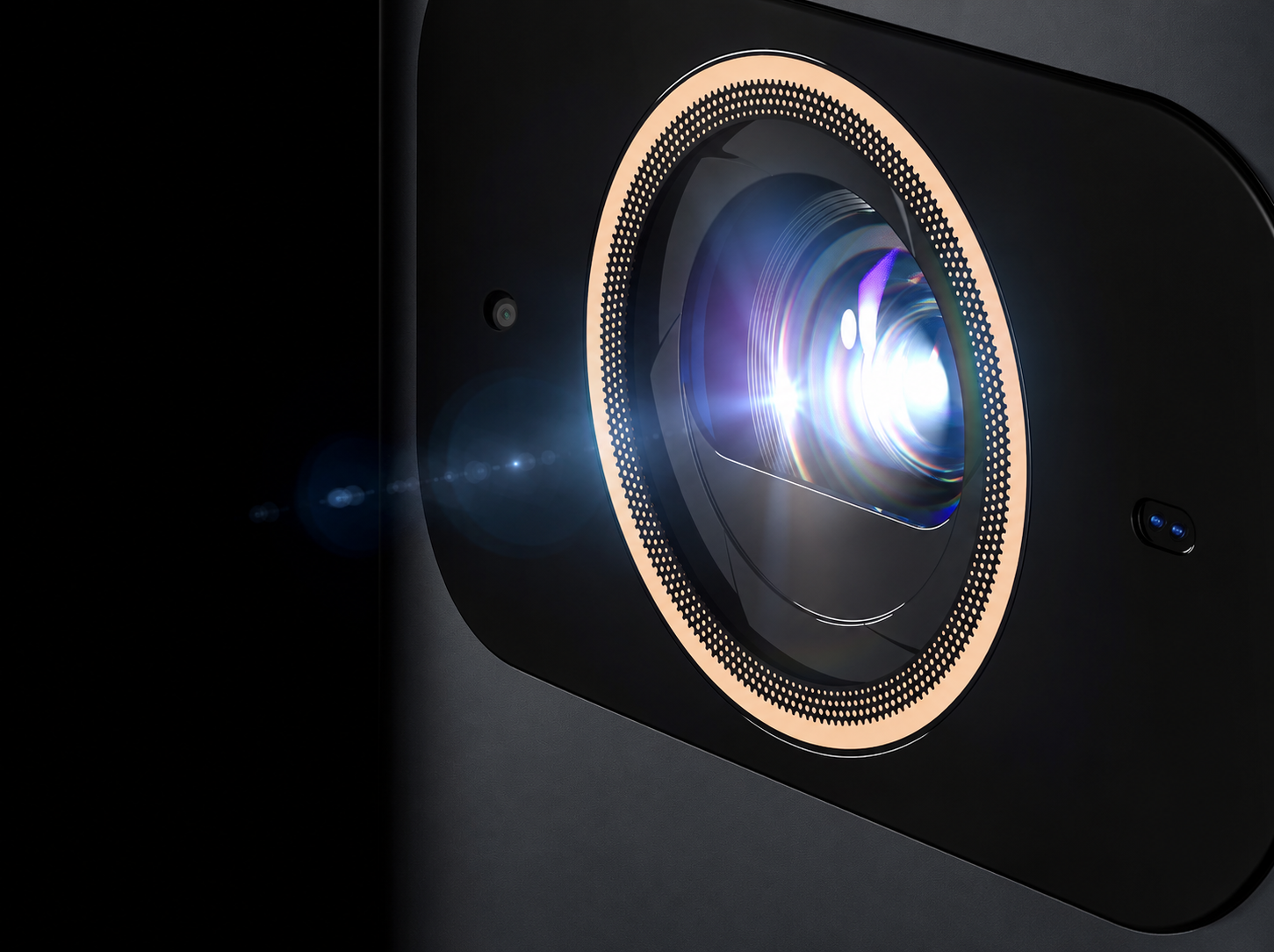
Projector Brightness Explained: What Really Makes a Projector Look Bright?
NexiGo | Aug 3, 2026
Don't Let Bigger Numbers Fool You
When shopping for a projector, brightness is often the first spec you'll notice. It's also one of the most misunderstood.
One projector advertises 3,000 lumens, while another claims 2,000 ANSI Lumens. At first glance, the choice seems obvious: the bigger number should produce the brighter image. In reality, it's not that simple.
Different brands measure brightness in different ways, and brightness alone doesn't determine how good a projector looks. Color performance, contrast, screen size, room lighting, and even the type of light source all influence the final image you see.
That's why two projectors with similar brightness ratings can deliver completely different viewing experiences.
In this guide, we'll explain what projector brightness really means, how to compare different brightness ratings, and how to choose the right projector based on where and how you actually watch.
What Is Projector Brightness?
Simply put, projector brightness refers to the amount of light a projector delivers onto a screen. It's measured in lumens (lm), the standard unit used to quantify visible light output.
In general, a brighter projector produces a more visible image, especially in rooms with ambient light. However, high brightness doesn’t mean better. A good, well-balanced projector should have the right brightness so that you can easily see the image under different viewing conditions.
A projector with the right brightness can:
- Deliver a clearer image in bright rooms and dark rooms
- Produce larger screen sizes without looking dim
- Better resist the effects of ambient light
- Improve everyday usability for TV, sports, and presentations
- Prevent eye strain over long viewing sessions
On the other hand, more brightness isn't always better.
In a completely dark home theater, an excessively bright projector can actually reduce viewing comfort, making bright scenes feel harsh and causing eye fatigue. That's why dedicated cinema rooms often prioritize balanced brightness, accurate colors, and strong contrast rather than simply chasing the highest lumen rating.
Key Takeaway: Brightness determines how visible an image is—not necessarily how good it looks.
Why Brightness Matters
The ideal brightness depends largely on your viewing environment.
Imagine watching the same projector in three different rooms:
- A dark bedroom with the lights off – Even a moderately bright projector can deliver an immersive cinematic experience.
- A living room at night with a lamp on – You'll need more brightness to maintain a vibrant picture.
- A sunlit family room during the day – Without enough brightness, the image may appear washed out, regardless of the projector's other strengths.
This is why there isn't a single "best" brightness for everyone. The right projector is the one that matches your room and your viewing habits.
Brightness Is Only One Piece of the Puzzle
While brightness is important, it's only one factor that determines overall image quality. A projector with impressive lumen ratings can still look disappointing if it has poor color performance, weak contrast, or is used in a room with too much ambient light.
Likewise, a projector with slightly lower brightness but better color reproduction and deeper blacks can produce a more engaging picture, especially for movies and HDR content.
That's why experienced reviewers rarely judge a projector by brightness alone.
Throughout this guide, you'll see that choosing the right projector is really about finding the right balance between brightness, color, contrast, and your viewing environment. But before comparing projectors, there's one more thing you need to understand: not every "lumen" measures the same thing.
Understanding Brightness Ratings
Walk through a projector store or browse online, and you'll quickly notice something confusing.
One projector advertises 3,000 Lumens.
Another lists 2,000 ANSI Lumens.
A premium model highlights 2,200 ISO Lumens.
To make things even more confusing, these numbers are not always directly comparable.
The word "lumens" simply describes the amount of visible light, but how that light is measured can vary significantly. Some ratings reflect the brightness of the final projected image, while others measure only the projector's light source before it passes through the optical system.
Knowing the difference can help you avoid one of the biggest marketing traps when shopping for a projector.
ANSI Lumens
For many years, ANSI Lumens has been the most widely recognized brightness standard in North America.
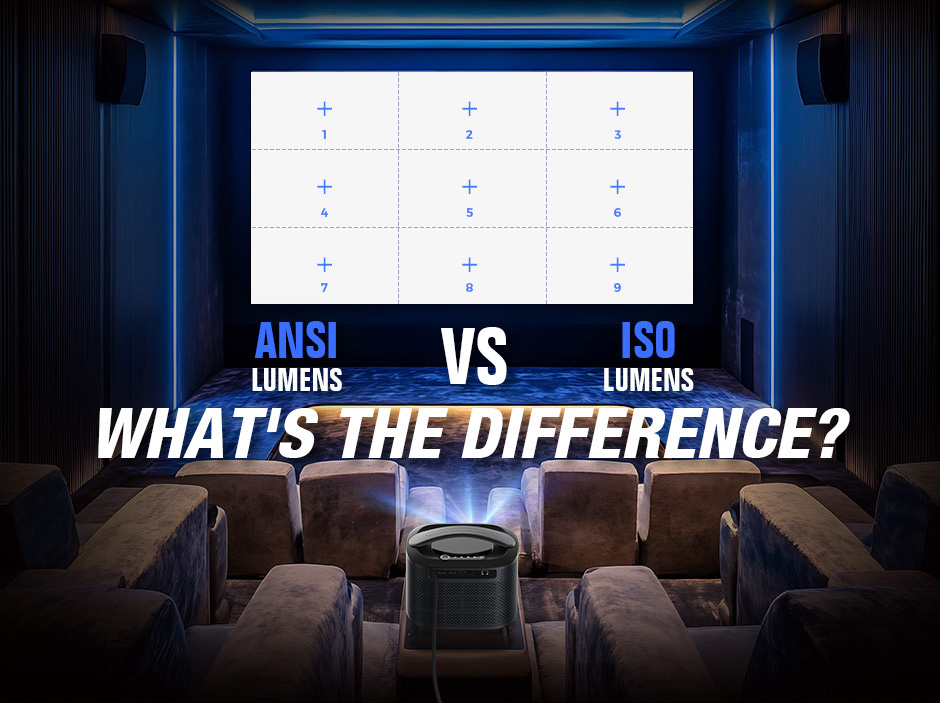
Instead of measuring the light produced by the lamp or laser, ANSI Lumens measures the brightness of the projected image itself. The image is divided into a 3 × 3 grid, and brightness is measured at nine different points before being averaged into a single value.
Because it evaluates the light that actually reaches the screen, ANSI Lumens provides a much more realistic indication of real-world brightness than raw light source measurements.
For most buyers, it's still one of the easiest and most reliable ways to compare projectors across different brands.
ISO Lumens
ISO Lumens is a newer international measurement based on the ISO 21118 standard.
Like ANSI Lumens, it measures the brightness of the projected image rather than the projector's light source. However, the ISO standard specifies stricter testing procedures and environmental conditions to improve consistency between different manufacturers and testing laboratories.
You'll increasingly see ISO Lumens on newer home theater projectors, especially from brands adopting international testing standards.
For everyday buyers, the takeaway is simple: Both ANSI Lumens and ISO Lumens are trustworthy measurements. If a projector uses either standard, you can generally compare those specifications with confidence.
LED Lumens
Unlike ANSI and ISO Lumens, LED Lumens aren't based on a universally accepted measurement standard.
Instead, they’re an unregulated measurement that some manufacturers use for LED projectors to reflect perceived brightness. Because calculation methods can vary, LED Lumens are most useful when comparing products within the same brand, not across different manufacturers.
If two projectors list only LED Lumens, don’t assume they'll perform the same as a projector rated in ANSI or ISO Lumens.
Light Source Lumens
Another specification you may encounter is Light Source Lumens (sometimes called Lamp Lumens or Laser Lumens).
This measures the maximum light output generated by the projector's light source before it passes through the projector's optical system.
By the time that light travels through mirrors, lenses, color filters, and imaging chips before landing on the screen, a significant amount is lost.
As a result, Light Source Lumens are usually much higher than the projector's actual on-screen brightness. That doesn't make the number inaccurate; it simply measures something different.
The problem is that when light source lumens are used in place of ANSI or ISO Lumens, the projector appears to have a higher lumen count that doesn’t actually reflect real-world brightness. This makes it impossible to accurately compare projectors without seeing them first-hand.
Brightness Ratings at a Glance
| Brightness Rating | What It Measures | Reliable for Comparing Projectors? |
|---|---|---|
| ANSI Lumens | Brightness of the projected image using the ANSI standard | ✅ Yes |
| ISO Lumens | Brightness of the projected image using ISO 21118 | ✅ Yes |
| LED Lumens | Estimated brightness for LED projectors | ⚠️ Only within the same brand |
| Light Source Lumens | Raw light output from the lamp, LED, or laser engine | ❌ No |
Buying Tip
If you're comparing projectors from different brands, look for ANSI Lumens or ISO Lumens whenever possible. These measurements provide the most meaningful indication of real-world image brightness.
If a product only advertises Light Source Lumens without mentioning ANSI or ISO Lumens, it's worth taking a closer look before making a purchase.
If you'd like to learn more about how these standards work and why they exist, check out our complete guide: ANSI Lumens vs. ISO Lumens: What's the Difference?
Brightness Is More Than Just Lumens
By now, you know that ANSI Lumens and ISO Lumens are the most reliable ways to compare projector brightness. But here's something that surprises many first-time buyers:
Two projectors with the same brightness rating can still produce very different-looking images.
That's because brightness is only one part of the viewing experience. Color accuracy, contrast, screen size, ambient light, projection screens, and even the projector's light source all influence how bright an image appears to your eyes.
Think of brightness as the engine in a car. It's important, but it's only one part of the overall driving experience.
Let's look at what else makes a projector appear bright in real-world use.
Color Performance: Bright White Doesn't Always Mean Bright Colors
Most brightness measurements use a pure white test pattern, making it easy to compare projectors under standardized conditions.
But movies, TV shows, and games aren't made of white screens; they're filled with colorful landscapes, skin tones, and HDR highlights. This is where Color Light Output (CLO) comes into play.
A projector with strong color brightness can maintain vivid, saturated colors even in brighter scenes, making the overall image appear more vibrant and lifelike. By contrast, a projector that prioritizes white brightness may still look impressive when displaying presentations or spreadsheets, yet colorful scenes can appear flatter or less saturated.
In everyday viewing, it's this balance between white brightness and color performance that creates a more immersive picture.
Contrast: Bright Highlights Need Deep Blacks
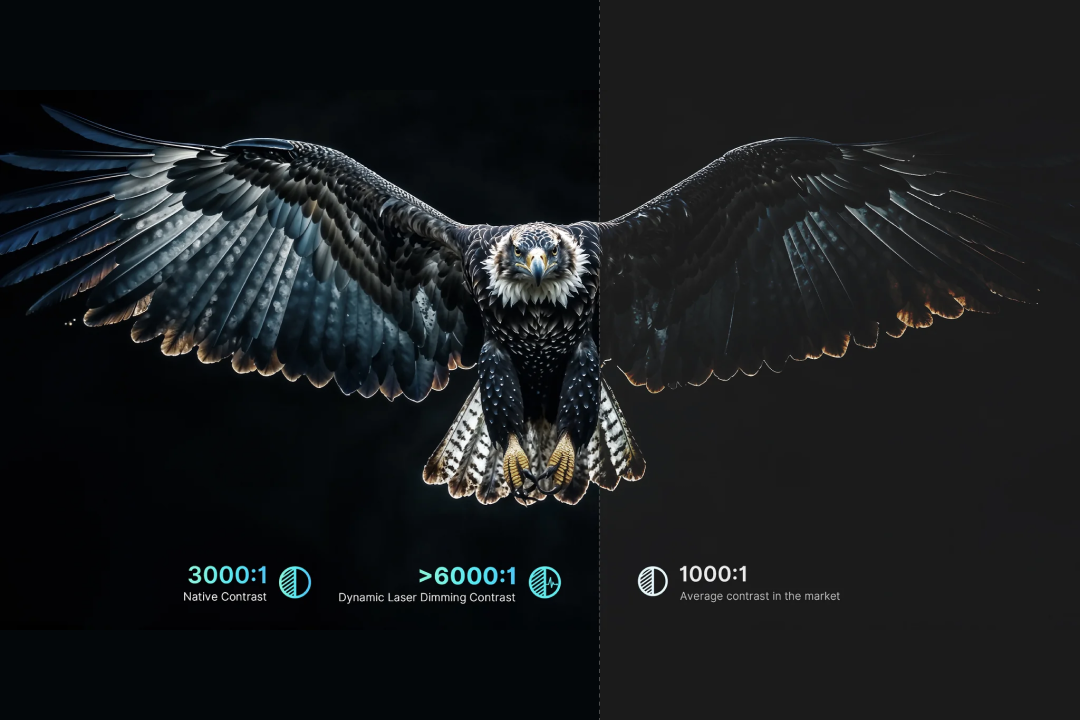
For HDR movies especially, good contrast is just as important as high brightness. Brightness determines how much light a projector can produce. Contrast determines how much depth that light creates.
Imagine watching a night scene in a movie. One projector displays deep blacks with crisp shadow detail. Another turns dark areas into a dull gray. Even if both projectors measure the same brightness, the first one will usually look more dynamic because bright highlights stand out against darker backgrounds.
This is why home theater enthusiasts often say: A projector doesn't just need to be bright. It needs to be able to get dark, too.
Screen Size: Bigger Isn't Always Better
A common misconception is that a projector's brightness stays the same regardless of image size.
In reality, the opposite is true.
As you increase the image size, the projector's light is spread over a larger surface area. The total amount of light doesn't change, but the brightness per square inch decreases.
For example, a projector that looks vibrant on a 100-inch screen may appear noticeably dimmer when expanded to 150 inches, even though the brightness rating remains exactly the same.
This doesn't mean you should avoid larger screens; it simply means that larger images require more brightness to maintain the same visual impact.
Ambient Light: The Fastest Way to Wash Out an Image
No matter how bright your projector is, ambient light will always compete with it. Sunlight through a window, ceiling lights, or even a nearby table lamp can reduce perceived brightness by washing out colors and lowering contrast.
That's why a projector that looks spectacular in a dark showroom may appear much less impressive in a bright living room. To reduce ambient light and improve your image quality:
- Close curtains or blinds during daytime viewing
- Dim room lighting for movie nights
- Position the screen away from direct sunlight
Even small reductions in ambient light can make a noticeable difference.
The Right Screen Can Be More Valuable Than Extra Lumens
Many people begin with a plain white wall, and for casual use, that's perfectly fine.
However, a dedicated projection screen reflects light more evenly, helping improve perceived brightness, color consistency, and overall image quality. There are two common options:
Matte White Screen
A matte white screen offers neutral color reproduction and works best in dedicated home theaters where you can control the lighting.
ALR (Ambient Light Rejecting) Screen
If your projector is installed in a living room or another space with unavoidable ambient light, an ALR screen can make a dramatic difference.
Rather than simply reflecting all incoming light, an ALR screen is designed to direct more of the projector's light toward the viewer while rejecting light from windows and room lighting. The result is a picture that appears brighter and maintains better contrast during daytime viewing.
Buying Tip: Before upgrading from a 2,000-lumen projector to a 3,000-lumen model, ask yourself whether investing in an ALR screen would deliver a bigger improvement.
Does the Light Source Matter?
Yes, but perhaps not in the way many people think.
The light source itself doesn't automatically determine how bright a projector will be. Instead, it influences characteristics such as color performance, brightness stability, lifespan, and maintenance.
| Light Source | Strengths | Considerations | Best For |
|---|---|---|---|
| Lamp | Very high brightness, proven technology | Brightness gradually decreases over time; lamps require replacement | Conference rooms, classrooms, budget home theater |
| LED | Long lifespan, compact size, energy efficient | Typically lower brightness than larger home theater models | Portable projectors, bedrooms, casual entertainment |
| Laser | High brightness, excellent color performance, long lifespan, minimal maintenance | Higher initial cost | Premium home theater, gaming, TV replacement |
The best option depends on your room, budget, and viewing habits.A portable LED projector may be the perfect choice for occasional movie nights or travel, while a laser projector is better suited to users seeking a large-screen TV replacement.
The Big Picture
By now, one thing should be clear: Brightness is only one piece of the puzzle.
A projector with slightly lower brightness but better color reproduction, stronger contrast, and a screen matched to your room can often deliver a more satisfying viewing experience than one with a much higher lumen rating.
So rather than asking:
"Which projector has the most lumens?"
A better question is:
"Which projector is best suited to the way I watch?"
That's exactly what we'll answer next.
Choosing the Right Brightness for Your Room
Now that you understand how projector brightness works, the next question is simple:
How many lumens do you actually need?
The answer depends less on chasing the highest number and more on where you'll use your projector.
A bedroom movie setup has very different requirements from a bright living room used as a TV replacement. Choosing the right brightness for your environment often makes a bigger difference than simply buying the brightest projector you can afford.
The recommendations below compare representative models in each category. Rather than naming a single "winner," we've highlighted the strengths and trade-offs of each to help you find the best fit for your viewing habits and budget.
Scenario 1: Dedicated Home Theater or Dark Bedroom
Recommended Brightness: 800–2,000 ANSI / ISO Lumens
If you mainly watch movies with the lights off, you don't need extreme brightness. In fact, a projector that's too bright can make HDR highlights uncomfortable during long viewing sessions.
For this type of setup, look for balanced brightness, accurate colors, good contrast, and quiet operation.
| Models | NexiGo PJ40 Pro | XGIMI MoGo 4 Laser |
|---|---|---|
| Approx. Price | ~US$269 | ~US$669 |
| Brightness | 700 ANSI Lumens | 550 ISO Lumens |
| Pros | ✓ Excellent brightness for its price class
✓ 3000:1 high contrast ratio ✓ Natural, well-balanced colors for movies ✓ Quiet cooling system ✓ Strong value for a fixed home setup ✓ Integrated Google TV platform | ✓ Laser powered ✓ Compact and lightweight ✓ Built-in battery for portable use ✓ Stylish all-in-one design ✓ Easy to carry between rooms or outdoors |
| Cons | • Fixed installation is more suitable than travel
• 1080p resolution instead of 4K | • Lower brightness limits screen size in brighter rooms • Battery life may not cover longer movie sessions |
| Best For | Budget-conscious users building their first home theater | Casual viewers who prioritize portability and convenience |
Which One Is Right for You?
If your projector will stay in one room and your priority is movie nights with balanced picture quality, the NexiGo PJ40 Pro offers one of the best value propositions in its class.
If you want something you can easily move between rooms or take outdoors, the XGIMI MoGo 4 is the more flexible option.
Scenario 2: Living Room (Evening Viewing or Curtains Closed)
Recommended Brightness: 1,800–2,500 ANSI / ISO Lumens
This is the sweet spot for many households.
The projector needs enough brightness to handle some ambient light while maintaining rich colors for streaming, sports, and gaming.
Wide color gamut, HDR support, and overall image balance become just as important as brightness.
| Models | NexiGo TriVision Ultra | BenQ GP520 |
|---|---|---|
| Approx. Price | ~US$1,299 | ~US$1,499 |
| Brightness | 2,600 ANSI Lumens | 2,600 ANSI Lumens |
| Pros | ✓ Hybrid RGB Max Tri-LED-Laser engine delivers high brightness with minimal speckle
✓ 110% BT.2020 wide color gamut for exceptionally vivid images ✓ Outstanding factory color calibration (ΔE < 1) ✓ Dolby Vision and HDR10+ support enhance HDR movies ✓ Clean installation with hidden Fire TV Stick compartment | ✓ Integrated Google TV platform ✓ Fast automatic setup and screen adjustment ✓ Bright, punchy image for everyday streaming ✓ User-friendly smart home experience |
| Cons | • Streaming device sold separately • Premium price compared with standard LED projectors | •More limited color volume than RGB laser systems
• HDR impact is less noticeable in dark scenes • Black levels are average for dedicated movie watching |
| Best For | Movie lovers, gamers, and users seeking premium picture quality | Families looking for a simple all-in-one projector for everyday entertainment |
Which One Is Right for You?
If you enjoy movies, HDR content, or console gaming, the NexiGo TriVision Ultra offers a more immersive cinematic experience thanks to its triple-laser light engine and wider color reproduction.
If convenience is your top priority, the BenQ GP520 remains an excellent all-in-one solution for everyday entertainment.
Scenario 3: Daylight Living Room or TV Replacement
Recommended Brightness: 3,000+ ANSI / ISO Lumens
If your projector replaces a TV and will often be used during the day, brightness becomes much more important.
However, don't rely on brightness alone. Pairing a high-brightness projector with an ALR screen will usually produce a much larger improvement than increasing brightness by a few hundred lumens.
| Models | NexiGo Aurora Pro MKII | Epson EpiqVision Ultra LS800 |
|---|---|---|
| Approx. Price | ~US$2,699 | ~US$2,999 |
| Brightness | 2,400 ANSI Lumens | 4,000 Lumens* |
| Pros | ✓ Excellent perceived brightness thanks to RGB laser and wide color volume ✓ Dynamic contrast ratio over 30,000:1 delivers excellent HDR depth ✓ Dolby Vision and HDR10+ support ✓ 107% BT.2020 color gamut with excellent color accuracy ✓ 60W Dolby Atmos speaker system ✓ Outstanding gaming performance with low input lag | ✓ Extremely bright image for daytime viewing ✓ Excellent performance in bright family rooms ✓ Mature software platform and easy daily operation ✓ One of the brightest UST projectors available |
| Cons | • Performs best with a quality ALR screen • Premium investment for a complete setup | • Narrower color gamut than RGB laser competitors • No Dolby Vision support • HDR movies don't appear as vibrant as newer RGB laser models |
| Best For | Home theater enthusiasts wanting one projector for movies, gaming, and everyday TV | Users who prioritize maximum daytime brightness above all else |
Which One Is Right for You?
If daytime sports, news, and television are your main priorities, the Epson LS800 is still one of the brightest ultra-short-throw projectors available.
If you're looking for a projector that balances brightness, color accuracy, HDR performance, gaming, and movie watching, the NexiGo Aurora Pro MKII delivers a more rounded home theater experience.
Quick Reference Guide
| Viewing Environment | Recommended Brightness | Ideal Choice |
|---|---|---|
| Dark bedroom or dedicated theater | 800–2,000 ANSI / ISO Lumens | Prioritize color accuracy and contrast over raw brightness. |
| Living room (night or curtains closed) | 1,800–2,500 ANSI / ISO Lumens | Look for a balanced projector with good HDR and wide color gamut. |
| Bright living room or TV replacement | 3,000+ ANSI / ISO Lumens | Pair a bright projector with an ALR screen for the best results. |
Conclusion
Choosing a projector isn't about finding the highest lumen number; it's about finding the right balance for your space. Before making your purchase, remember these five simple rules:
✅ Compare ANSI Lumens or ISO Lumens, not Light Source Lumens.
✅ Buy for your room, not just the specification sheet. A dark home theater doesn't need the same brightness as a sunlit living room.
✅ Brightness is only part of image quality. Color performance and contrast often have a bigger impact on how bright a projector actually looks.
✅ Think about your screen. A quality projection screen (especially an ALR screen in bright environments) can improve the viewing experience more than simply buying a brighter projector.
✅ Choose a projector that matches your lifestyle. A portable projector, a dedicated home theater model, and a UST laser TV all serve different needs.
When brightness, color, contrast, and your viewing environment work together, you'll enjoy a picture that feels brighter, more immersive, and more natural, regardless of what the number on the box says.
How to Compare Projectors Fairly
Aurora Pro: Precision Brightness, Perfectly Tuned
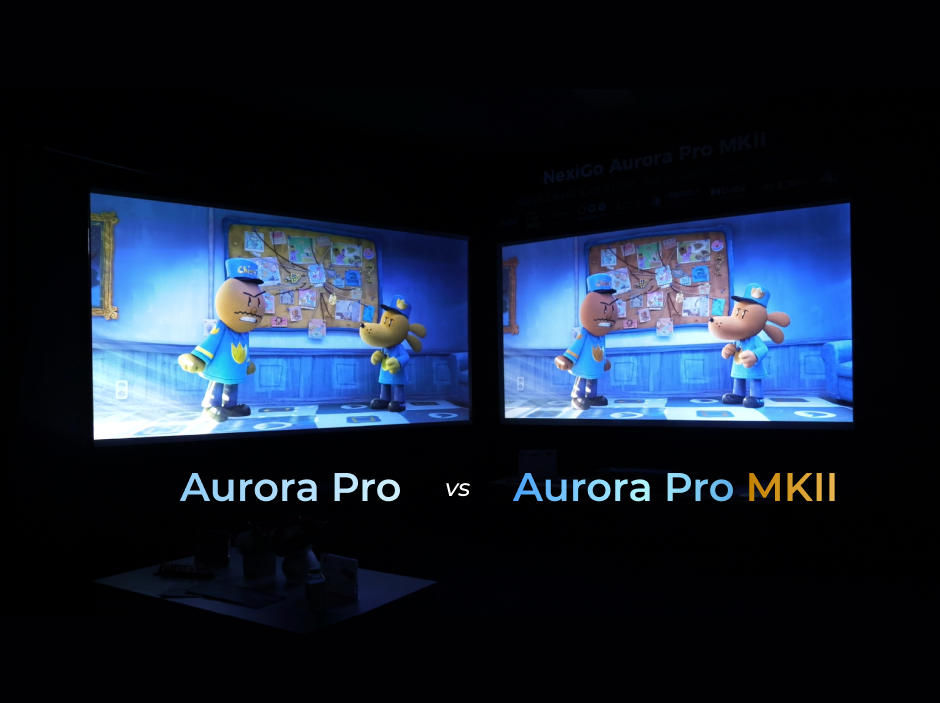
The Aurora Pro is designed around the idea that brightness should enhance realism, not overpower it. Its intelligently modulated light output delivers vivid images while preserving shadow detail and color depth in both dark and semi-lit rooms.
Who it’s for:
Home theater enthusiasts seeking a refined cinematic experience with balanced brightness, accurate color, and immersive sound.
Why it works:
Instead of pushing excessive brightness, the Aurora Pro focuses on tonal balance — ensuring highlights remain natural and blacks stay rich without eye strain.

- Stunning 4K with Dolby Vision for lifelike contrast and depth
- 6,000:1 Dynamic Contrast for deeper blacks and enhanced detail
- 107% BT.2020 Wide Color Gamut with △E≈1 color accuracy
- 60 W speakers with Dolby Atmos, plus HDMI eARC support for external audio
- 4K at 120 Hz Input and 4.2 ms~ 8 ms latency is ideal for gaming and high-definition content.
- Brightness tuned for comfort, not intensity
Aurora Pro MKII: Precision Brightness for Dedicated Home Theaters
Building on the Aurora Pro, the MKII introduces an upgraded Scene Adapt Engine (SAE) with finer real-time control over brightness and contrast. The result is smoother transitions between dark and bright scenes, more realistic shadow detail, and a picture that feels effortlessly natural.
Who it’s for:
Dedicated home theater users who demand reference-level contrast, precise brightness control, and true cinematic immersion.
Why it works:
With 2400 ANSI lumens, the Aurora Pro MKII sits squarely in the ideal home-theater brightness range: powerful enough for impact, yet restrained enough to preserve contrast integrity.

- Dynamic Contrast Ratio over 30,000:1 for true blacks and radiant highlights
- Next-Gen ALPD® 5.0 Laser Engine with Dolby Vision & HDR10+
- 2400 ANSI lumens optimized for cinematic viewing
- 0.21:1 Ultra Short Throw Ratio, ideal for smaller rooms and large screens
- 4K at 120 Hz Input and 4.2 ms~ 8 ms latency is ideal for gaming and high-definition content.
- 107% BT.2020 color gamut with △E≈1 accuracy
- 60 W Dolby Atmos speakers for immersive audio
TriVision Ultra: Balanced Brightness for Living Rooms
Operating at approximately 2600 ANSI lumens, the TriVision Ultra delivers vivid HDR-like performance while maintaining excellent contrast and color accuracy. Its brightness is carefully balanced to handle everyday ambient light without sacrificing cinematic depth.
Who it’s for:
Movie lovers who want authentic cinematic visuals in a living room environment, without the premium price tag.
Why it works:
By pairing moderate brightness with high color fidelity, the TriVision Ultra creates images that feel rich, natural, and immersive — even outside a dedicated theater room.

- Hybrid RGB Max Tri-LED-Laser technology for bright, speckle-free images
- 2600 ANSI lumens with 110% BT.2020 Wide Color Gamut
- Outstanding out-of-box color accuracy (△E<1)
- 4K with Dolby Vision and HDR10+ support
- Hybrid RGB Max Tri-LED-Laser technology for bright, speckle-free images
- Auto Screen Adaptation for fast, easy setup
- Hidden Fire TV Stick compartment (stick not included) for a clean installation
Frequently Asked Questions
Like what we do? Stay tuned for more.
Whether you work at home or in the office, NexiGo provides a wide range of quality and affordable technology to elevate your daily life. Our products encompass everything from webcams and portable monitors to projectors and gaming accessories.
Articles we think you'll love