NexiGo Gripcon Controller with HDMI & RGB Indicators for Switch 2

$47.99

Shipping calculated at checkout.

  • Hall Effect thumbsticks & 16 programmable buttons
  • Ergonomic Gripcon controller for Switch 2
  • Customizable RGB ringlight with adjustable brightness
  • Turbo function, adjustable vibration & motion controls
  • HDMI output, kickstand

Color: Cosmic Nebula

  • Cosmic Nebula
  • Black

Style: Gripcon Only

  • Gripcon Only
  • Gripcon + Case
$47.99
Out of stock
A Gripcon placed on a flat surface with hills in the background.This is an image showcasing the product’s key selling points.
A muscular man playing the Switch 2 Gripcon.
The controller joystick features RGB lighting with adjustable colors, brightness, and modes.
This is an image showcasing auto turbo, vibration, and six-axis motion control.
Exploded view of the Hall-effect joystick showing the internal magnets.
The Gripcon features Hall-effect triggers for more precise feedback.
The Gripcon’s joystick caps can be replaced as needed.
The Gripcon with an HDMI port supports video output functionality.
The Gripcon features a USB-C port for connecting to more devices.
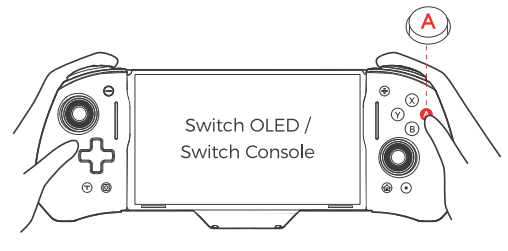
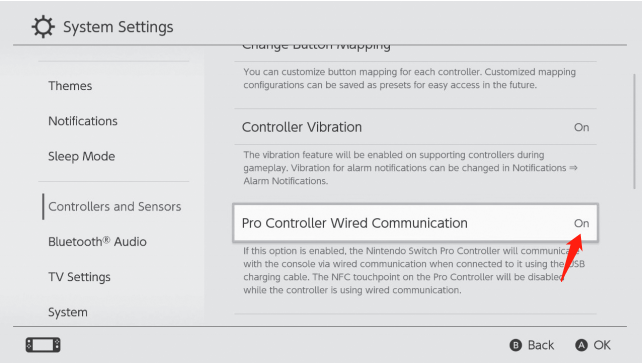
Detailed Instructions for Enabling Wired Connection on the Switch 2
Showcasing the two modes of the Gripcon.
A woman sitting on a sofa playing Switch 2 games.

Hall Effect Gripcon Kit for Switch 2

This bag is opened and displayed on the desk, showing compatible Switch accessories it can hold.
Three-section image showing bag dustproof, waterproof & smooth zipper.
A man carrying the bag by hand
A Gripcon placed on a flat surface with hills in the background.This is an image showcasing the product’s key selling points.
A muscular man playing the Switch 2 Gripcon.
The controller joystick features RGB lighting with adjustable colors, brightness, and modes.
This is an image showcasing auto turbo, vibration, and six-axis motion control.
Exploded view of the Hall-effect joystick showing the internal magnets.
The Gripcon features Hall-effect triggers for more precise feedback.
The Gripcon’s joystick caps can be replaced as needed.
The Gripcon with an HDMI port supports video output functionality.
The Gripcon features a USB-C port for connecting to more devices.
Detailed Instructions for Enabling Wired Connection on the Switch 2
Showcasing the two modes of the Gripcon.
A woman sitting on a sofa playing Switch 2 games.

Hall Effect Gripcon Kit for Switch 2

This bag is opened and displayed on the desk, showing compatible Switch accessories it can hold.
Three-section image showing bag dustproof, waterproof & smooth zipper.
A man carrying the bag by hand
A Gripcon placed on a flat surface with hills in the background.2.jpg__PID:63cbd940-aaa6-4c34-81f2-798b9312598f
This is an image showcasing the product’s key selling points.
A muscular man playing the Switch 2 Gripcon.
This is an image showcasing auto turbo, vibration, and six-axis motion control.
Exploded view of the Hall-effect joystick showing the internal magnets.
The Gripcon features Hall-effect triggers for more precise feedback.
The Gripcon’s joystick caps can be replaced as needed.
The Gripcon features a USB-C port for connecting to more devices.
Detailed Instructions for Enabling Wired Connection on the Switch 2
Showcasing the two modes of the Gripcon.
A woman sitting on a sofa playing Switch 2 games.

Hall Effect Gripcon Kit for Switch 2

This bag is opened and displayed on the desk, showing compatible Switch accessories it can hold.
Three-section image showing bag dustproof, waterproof & smooth zipper.
A man carrying the bag by hand
A Gripcon placed on a flat surface with hills in the background.This is an image showcasing the product’s key selling points.
A muscular man playing the Switch 2 Gripcon.
The controller joystick features RGB lighting with adjustable colors, brightness, and modes.
This is an image showcasing auto turbo, vibration, and six-axis motion control.
Exploded view of the Hall-effect joystick showing the internal magnets.
The Gripcon features Hall-effect triggers for more precise feedback.
The Gripcon’s joystick caps can be replaced as needed.
The Gripcon with an HDMI port supports video output functionality.
The Gripcon features a USB-C port for connecting to more devices.
Detailed Instructions for Enabling Wired Connection on the Switch 2
Showcasing the two modes of the Gripcon.
A woman sitting on a sofa playing Switch 2 games.

Hall Effect Gripcon Kit for Switch 2

This bag is opened and displayed on the desk, showing compatible Switch accessories it can hold.
Three-section image showing bag dustproof, waterproof & smooth zipper.
A man carrying the bag by hand

Chapters
0:16 What's in the box?
0:40 How do I pair it with my Nintendo Switch 2?
1:03 What is the average margin of error for this controller?
1:12 How do I replace the thumbstick caps?
1:30 How do I connect it to my TV?
1:54 How do I program the mappable buttons?
2:24 How do I reset a programmed button?
2:50 How do I change the color of the RGB lights?
3:03 How do I make the RGB lights change dynamically?
3:26 How do I adjust the brightness of the RGB lights?
3:40 How do I use the Turbo Function?
4:08 How do I adjust the speed of the Turbo Function?
4:31 How do I adjust the vibration level?
4:56 Does this controller have motion controls?
5:05 How many game cartridges can it store?
5:11 What is the USB port for?
5:25 How do I fix stick drift?
5:53 Can I charge while I play?

Chapters
00:18 What‘s included?
00:29 What else fits inside?
01:00 How do I pair it with my Nintendo Switch 2?
01:21 What is the average margin of error for this controller?
01:33 How do I replace the thumbstick caps?
01:48 How do I connect it to my TV?
02:12 How do I program the mappable buttons?
02:43 How do I reset a programmed button?
03:09 How change the color of the RGB lights?
03:22 How do I make the RGB lights change dynamically?
03:45 How do I adjust the brightness of the RGB lights?
03:58 How do I use the Turbo Function?
04:27 How do I adjust the speed of the Turbo Function?
04:50 How do I adjust the vibration level?
05:15 Does this controller have motion controls?
05:23 How many game cartridges can it store?
05:31 What is the USB port for?
05:44 How do I fix stick drift?
06:10 Can I charge while I play?

Sunday,Monday,Tuesday,Wednesday,Thursday,Friday,Saturday
January,February,March,April,May,June,July,August,September,October,November,December
Not enough items available. Only [max] left.
Add to WishlistBrowse WishlistRemove Wishlist
Shopping cart

Your cart is empty.

Return To Shop

Add Order Note Edit Order Note
Estimate Shipping
Add A Coupon

Estimate Shipping

Add A Coupon

Coupon code will work on checkout page


My Wishlist

Loding your saved items

Don't lose your wishlist!

My Wishlist

Loding your saved items

Don't lose your wishlist!